Widget is not displayed properly after turning off the KWGT notification even when battery is unoptimized

A notification is required for a KWGT widget to work properly, when the battery is optimized. I didn’t want the notification showing up permanently in my notification dash, so I just turned off battery optimisation for KWGT.

I then turned off notifications, but the widget stopped displaying everything in its proper font and arrangment, even when KWGT has unoptimized battery usage. Is there a way to fix this? I can’t really keep a permanent notification like this.
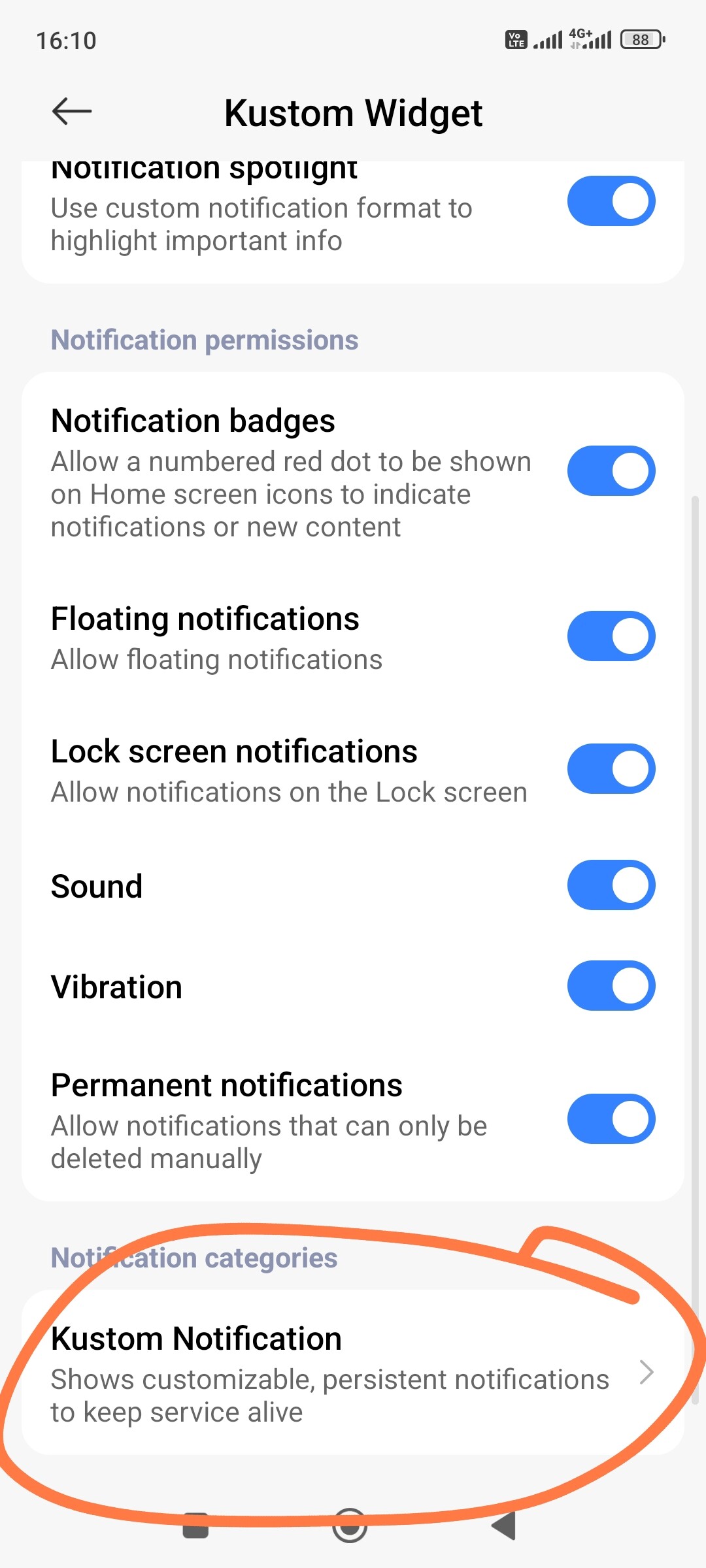
Actually, you don’t need to turn off all notifications. Here is how you do it properly:

Keep the 'Battery O

ptimization’ turned OFF (that was correct, don’t change that!).

Go to Settings → Apps → KWGT → Notifications.

Scroll down to Notification Categories.

Find the one called ‘Kustom Notification’ (or ‘Background Service’) and turn it OFF individually.

Well I had turned off notifications individually from the app.

I did some things like removing the widget and switching widgets, and something worked out somehow and now the widget displays properly.