Using tasker and two boxes overlaid in KLWP, I need one box to be visible when youtube is open and running and one box visible when youtube is not open and running

TLDR: I need to set up a formal to show one overlay box when youtube is not running and another overlay box when youtube is running (not just playing, but even when open and not playing) using Tasker and Im sorta lost on how to properly set up both the Tasks and the forumlas on the KLWP receiving side.

Im having a little trouble setting something up and was hoping.you guys could give me some guidance. To preface Im very new to this and sorta teaching myself. This is on a note20 ultra, running nova8. The KLWP im using is ZeroDay by outtiefivethou. I do have tasker (version 6.5.11) with the plug in for KWLP.

I spent the past couple days modifying the button mapping for ZeroDay to better suit my needs. Out of the box it has two overlaid boxes on the button of each app. The stacked group is labled “alert”, box 1 is “hazard” and box 2 is “notification”. Out of the box the formulas are set so if the app does not have a notification the hazard box is visible and if the has a notifications the notification box is visible; so when you have notifications it looks like a light on the button illuminates.

Ive remapped and relabled several of those buttons with apps that I do not care if there is a notification, one of them being youtube.

My goal is to have the hazard box visible when youtube is not active, and to have the notification box visible when youtube is open. So when youtube is open the small box on the larger button is lit up. I want this done when youtube is in fullscreen, pop-up screen mode, and even when youtube is not playing anything and is in a separate tab (you know when you hit the home screen and see all the apps you have open and swipe left and right to pick one).

Ive been working on it but cant seem to get it right. (But most of what I found were AI answers from google so Ive either found a lot of wrong answers or Im just not understanding it).

From what I understand I need to:.

  1. create a task in Tasker to send a variable to KLWPs. Does it need an enter and exit task or do I need to somehow set it to monitor the foreground for the app (not sure how to do that).

2)create a global variable in the global tab to receive the variable from tasker (a br one right? And is a global varible for this even nesscerry since Im only using it for this one thing…can I just skip to step 3? I do already a package for youtube set up, do I need to utilize that as well?).

  1. put a formula in both the hazard and notification boxes (a br one right? Do use a formula that ends in always,never for one box and never, always for the other? (This has to use the same name that the tasker variable name is right?)

Im really stumbling in the dark here and any help would be appreciated.

Thanks.

Amazing :star_struck:
Greatest informative content

amazing greatest informative content

It’s kind of tricky to follow what it is you’re describing exactly, but the parts that I think I do understand, you have two items that you want only one to be visible, depending upon another condition. So one is visible by default and it disappears and the other appears whenever this condition is met.
The only way for Tasker to talk to KLWP is via that br() function, and it only goes one way. It’s also tricky, because of what variable name you actually put in the function call, so you might want to experiment with that just by itself or look online for somebody who’s done it recently and may have some information. But it sounds like all you’d really need to do is have Tasker watch what app is open, and I think you can test both for the app being open and the app being the front most app. I feel like I’ve done this before with Tasker.
You’d set a profile based on the app, and pick YouTube, and that condition should be triggered when YouTube opens, and optionally since it’s a Tasker profile, you can have a different set of actions when YouTube is closed. The only action you would really need is to have Tasker send that broadcast of whatever signal you want to use, it could be a 1, or a word, whatever you like, since you’re really just communicating binary (true/false) information.
On the KLWP side, the call to the br() function should pick up that variable content and put it into a Global that you have created in your wallpaper.
If you then have your two overlapping panels there, you would use the value that is in that Global variable to trigger the switch between their visibility. So what you would be setting is, for example, if you’re sending a 1 from Tasker, you could set the visibility of one of the panels to equal that value (1=true), which I believe KLWP treats as true/on/yes, which should make that panel visible, and at the same time, on the other panel, it’s exactly the same except you set it to NOT the variable because of the way klwp does its syntax, which inverts it, so the 1 would become a 0, which would tell that panel to be invisible. Then, I guess you would want Tasker to fire that exit condition when YouTube disappears and then send to KLWP the value of 0. So the first panel will receive a 0, which means it should turn invisible, and the other panel that has the NOT will turn the 0 into a 1.
I definitely recommend trying each bit of this by itself, because there’s a few moving parts here, and there are quirks to both Tasker and KLWP, some of these things might not work the way you expect, and you have a hard time isolating what the problem is.
Firstly, I recommend checking the broadcast from Tasker to KLWP. Just figure out how to get that working (it’s not intuitive). I would recommend sending a 1 or a 0, providing the next test works, which is to verify that the visibility property can take a value of 1 or 0 and interpret it correctly, or if it’s looking for something else. My hunch is that one and zero would work. It would be kind of a crazy thing for a coder to not design that ability. But even if it doesn’t, you can use a function call to if, so that you can translate whatever values it wants from whatever you’re sending from Tasker.

If I can actually export it, I will try to post my kwgt widget that receives input from Tasker. It’s a little different than yours, but much of the hard stuff is the same. You might also find that it is a better approach, for whatever reason, to use just a single panel, and then update the panel with whatever thing should be in there at the time. Making an overlap group with your two panels on top of each other should actually work fine, though if you have any condition where you might want both to be visible, then I would use a different solution of putting them into a horizontal stack group, where they don’t overlap, but since only one will be visible at the time, when it lays out, the visible one should be in the middle.
The reason for my suggesting that is that the thing that I did with my widget was ultimately just make Kustom act as a dumb monitor, and then have Tasker do all of the calculation and reading files and stuff like that to prepare something for the widget to display, which is scrolling text, and I gave the display an old school green phosphor monitor look, and I can send anything I want to from Tasker, as far as text goes, and then send it to the monitor to display.

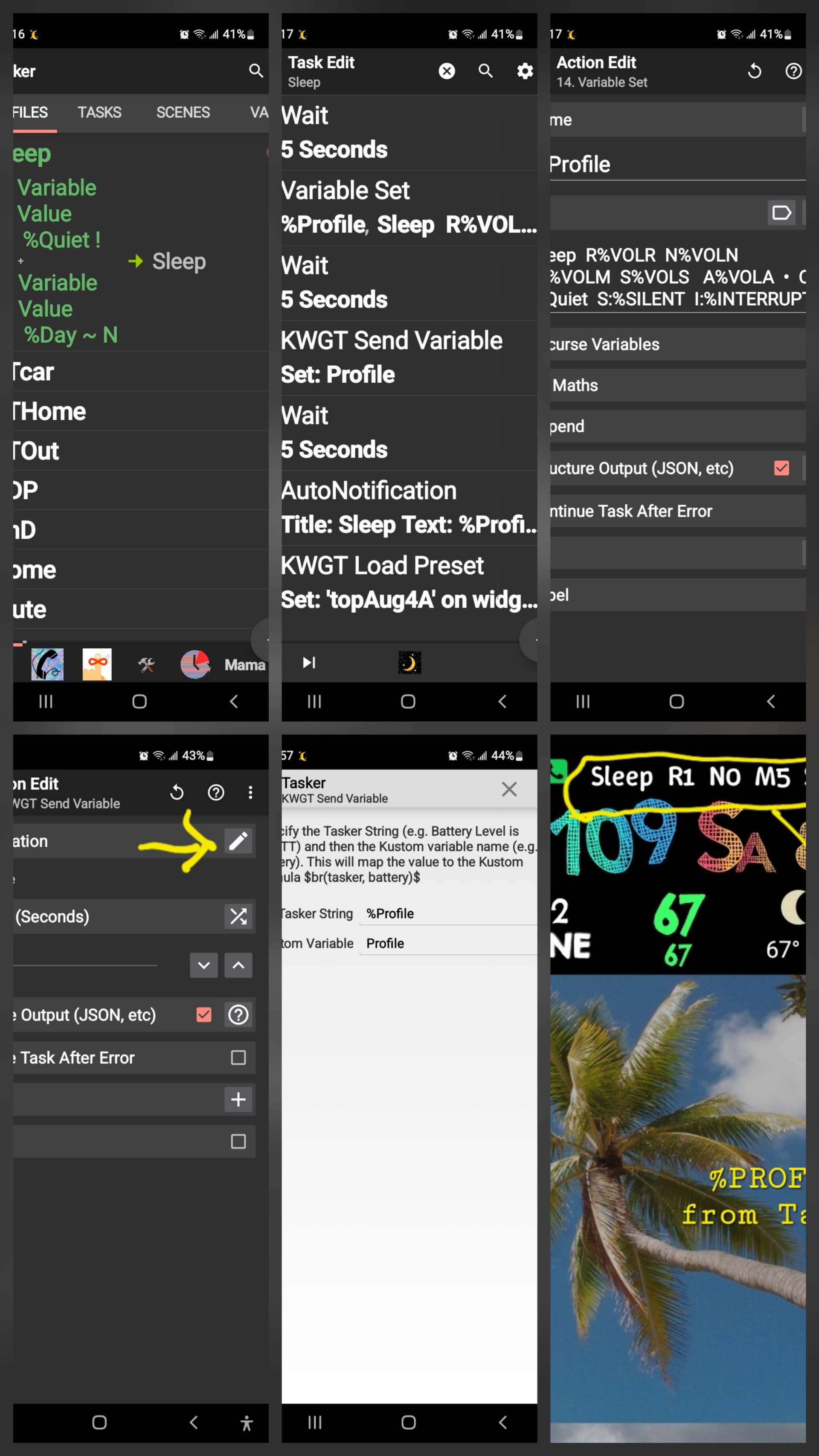
Hi. I will try to answer in the order asked. #1 to send a variable from Tasker, there aren’t really enter and exit tasks for this. What you want is to create a profile that will trigger the variable to send. This “trigger” can be when a certain app is open / running, time, triggered by another task, incoming call, etc. Connected to this "Profile is the task that will run when conditions are met. I’ve been using Tasker since about 2014 and Kustom since about 2020 but every day still seems like a new adventure. I will attach a profile of mine and the task that sends variable to Kustom. I will do another reply tomorrow after I look at number two of your questions. I have a vision disability so I can only do so much screen time before I have to stop. I am attaching a sixth screenshot that shows you my custom widget that I use on my phone. It has all of my settings at a glance so that I can see the volume and stuff like that.

I forgot to show you how to get your variablevto actually show in Kustom. It will only let me attach one picture a day so this is screenshot number 7 if I could send it
Kustom:

  1. <+>
  2. Text
  3. The formula for this is in the “broadcast” section but here’s my specific formula, you can cut and paste this and put in your own variable name. $br(tasker, Profile)$ custom is picky about capitalization & spaces matching exactly so be mindful of that