I wonder if others encounter the same problem as I do with the flow editor’s “extreme willingness” to re-arrange flow steps? By this I mean that it is easy to accidentally re-order flow steps. In the following screen shot:
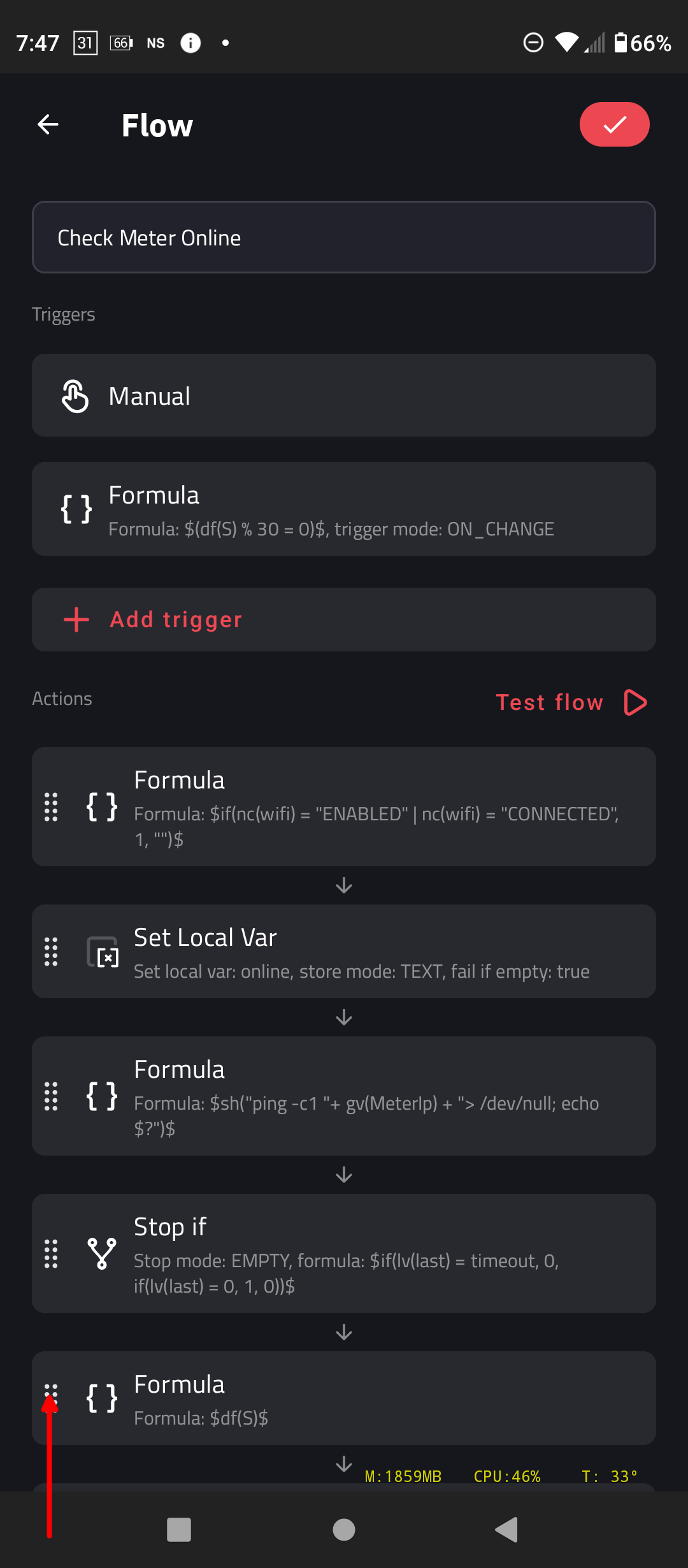
the red arrow points to a specific place in the UI where one typically (in other apps) would touch/drag to move an entry elsewhere in a list. This makes sense to me and is consistent with other apps.
But I have found several times that touching/dragging almost anywhere on the step’s entry will cause it to be moved. Any many time, the entry is moved quite far, quite quickly. There is no undo when this happens to me. And the only way to recover is to use the back button and NOT touching the check button up top to save. The problem with this is that any other editing that has been done to the flow is lost when doing so.
I know that this behavior is consistent with re-ordering other lists in the Kustom editor. But for some reasons, I feel this is a different case:
(a) In non-flow uses, this is really only a simple re-order. It is cosmetic only and it impacts nothing at all other than the order of presentation.
(b) In flow cases, this is actually changing of program logic - it is not just cosmetic. And, in the absence of an un-do mechanism, it can be much more difficult to put things back together. So a mis-step in this case can cause a bug in the flow. Obviously, there are many other ways to bugger-up a flow’s logic. But this way is far too easy to accomplish.
So it is my suggestion that re-ordering flow steps be constrained to ONLY when the area indicated with the red arrow is touched/dragged.
I personally feel that this should be true of all re-order-able lists. But the flow editor is the one that has repeatedly messed me up.
Thanks!