Hi all. I have a widget which i use as a budget tracker. It has worked smoothley till i changed my phone. When imported to the new device it broke. All the functions reading the file underneath no longer worked. The ones that read the file were fixed by changing the path used (from /storage/ emulated/0/Kustom to just /Kustom). But the button “Done” that executes the substraction (with this formula on touch: sh(“echo '” + (wg(“file://storage/emulated/0/Kustom/db/limit.jpg”,raw)-tc(reg,gv(input),“(.)#(.)”,“$1.$2”))+“’ >/storage/emulated/0/Kustom/db/limit.jpg”) ) says Permission Denied. Changing the path does not affect the error.
The widget on the old phone works normally as always. How can I fix it? All the spec are the same (Android version, app version ecc).
Your new device may be running a different version of Android with a new storage access policy. Try using a shortened version of the file path to see if that works.
Instead of using file://storage/emulated/0/Kustom/db/limit.jpg, use /Kustom/db/limit.jpg. This usually helps resolve storage access issues.
Hi Ace!
Thanks for your kind reply. I have tried many different solutions starting from your advice none of them seems to work. Very strange situation because the android version are the same, only different security patches (if they matter). An idea I have for this issue, as seen around in other forums, may be that the widget in the older phone was developed in an older Android version. Just a guess.
Anyway I solved the issue by using Tasker but now I face another issue : everything works as expected except that the new value is shown only if I enter into the Kustom editor and re-save the widget. How can i automate this? A button with the action to force text update does not work.
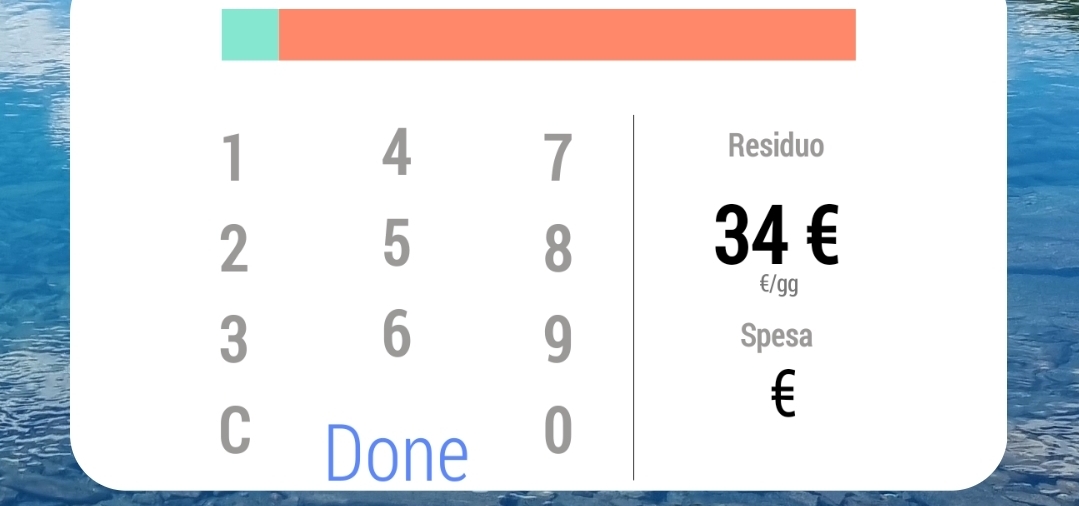
 : everything works as expected except that the new value is shown only if I enter into the Kustom editor and re-save the widget. How can i automate this? A button with the action to force text update does not work.