I am in big trouble with KWGT. I am a long time user and rely on KWGT greatly and now it is not working at all.
Since the most recent beta upgrade, widgets were not updating. I tried to restore the prior beta (using swift backup) and lost all of my widgets. Well, disappointing, but not tragic.
So, trying to restore. I am finding that KGWT can’t get anything from my working directory.
I have tried all of the following:
uninstalled, reinstalled
Got out of the beta program - to install the latest stable
Renamed my Kustom folder - and created a new custom folder
Whenever I try to select the working directory, I get a blank screen. If I press the back space, it terminates the program. For the life of me, I can’t seem to select a working directory - so I can’t create a new widget. I can’t see my saved widgets and I am basically dead in the water.
I have tried rebooting - and nothing seems to work. Hopefully I can get some solution. I depend greatly on KWGT.
And, since I tried to go back to the stable, it is telling me that the beta program is full!
My lates swift backup is 3.77b429113. I am running the latest LineageOS on a Moto G100. I have never had any issues like this.
OK - I am feeling stupid now. The standard file handler had been disabled. Actually, it was disabled for ages now and it never seemed to make a difference.
Now, I got myself out of the beta program - and it says that it is full. Is there any way to rejoin?
3.77 beta not working for me either. I turned off updates in Google play after I lost my widgets but it still updated again somehow. Hope there is a fix quickly
Now that I have had time to reflect on what may have happened, I think KWGT must have been able to detect a different “standard” file handler at some point, but more recently it needed to be the google file handler (and no MiXplorer that I used generally, by freezing the standard file handler). KWGT could not make use of MiXplorer.
I also encountered the issue with the beta - the widgets would not load. Not sure if that is file handler related or not - I have no way to check since I am out of the beta.
I would like to rejoin the beta program and would help determine if there were a fix.
I don’t think it’s the file handler as I never froze the default one on my system. If you get back in beta and ever run into an issue where you need to downgrade there is a link for kwgt official downloads here (if it’s not allowed to share here someone let me know but I figured since it’s a kustom link should be ok I’m kustom forum). I had to downgrade as 3.77 beta does not work for me at all.
That’s good to hear. I’m still seeing the export option from my end. Accessible from the edit mode. Just open the side panel by swiping from the left edge of your screen or tapping on the 3 lines from the top left corner. Export should be right below Load Preset.
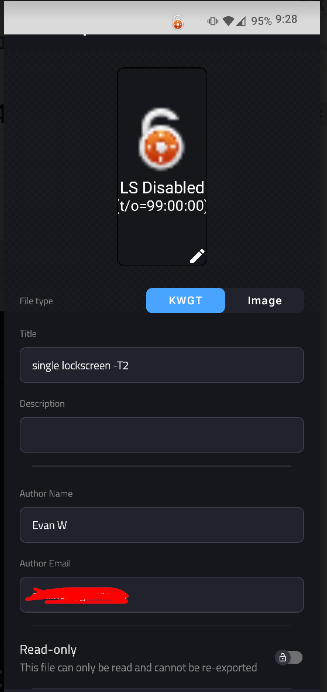
Thanks - I see the menu selection for export. However, when I go into the export, I see lots of fields, but no place that I can press for the preset to be saved. I have attached a screen shot.
I know that the issue has been confirmed (and thank you for doing that). Is there a bug report that I should be filling out so that the developer is aware of this issue?