Hello,
I need a place for a formula that automatically turns off my [Global] switch when the following occurs:
With “$wf(maxc, 0)$” I get the maximum temperature. And I need the time at which it drops. That would be the simplest solution.
*Info! I no longer get my weather data from the free providers, but now from “open-meteo”. So, $wg(gv(MyGlobalVariable"), json, .daily.temperature_2m_max[0])$
I need it for, for example, “Extreme Heat Warning” or “Thunderstorm.” Otherwise, it would take until the next day for my alarm counter 1 to return to 0.
My idea would be a second counter, but I have to update it manually via touch again.
How can I increment or decrement a counter without a manual “touch action”? Or do I need Tasker for automatic updating? Maybe it will work without it.
Thanks for the answers!
Hi there,
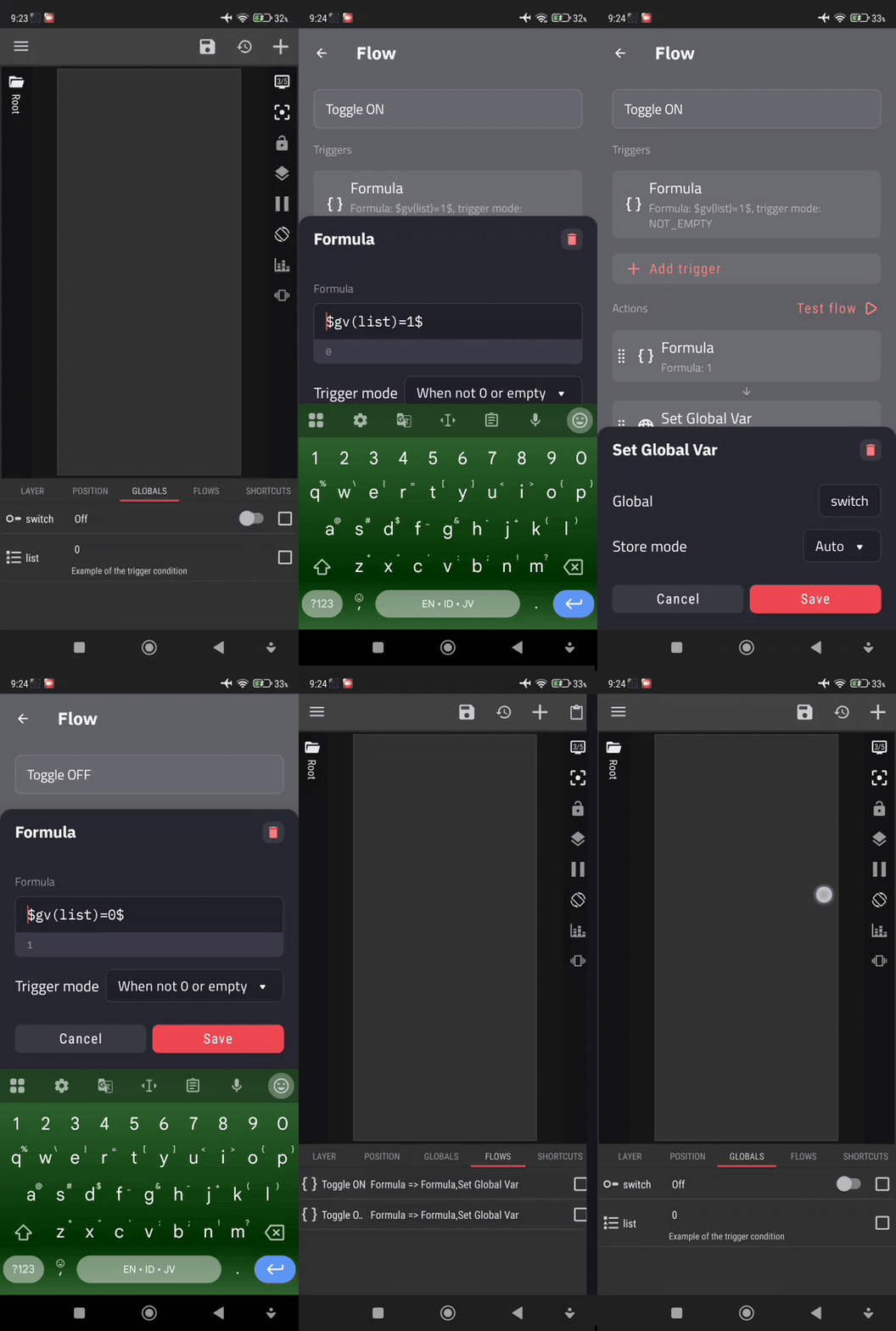
You might be interested in creating a Flow for this purpose. Set the Flow trigger to formula and type in your formula, then set the Flow action to update the value of a global variable, which is in this case, your On/Off Switch variable.
EXAMPLE
NOTES
- In my example, I use a List variable to simulate the condition for the Flow trigger.
I hope this would help.


Thank you. I’ve read up on it now.
If I understand correctly, I no longer need “Auto On” and “Auto Off” for the individual switches (alerts)? This is exactly the flow trigger does now takes over with more functions? I can query the state like with a switch and then execute an additional action? So to speak, X in one. I can now set the switches to manual?
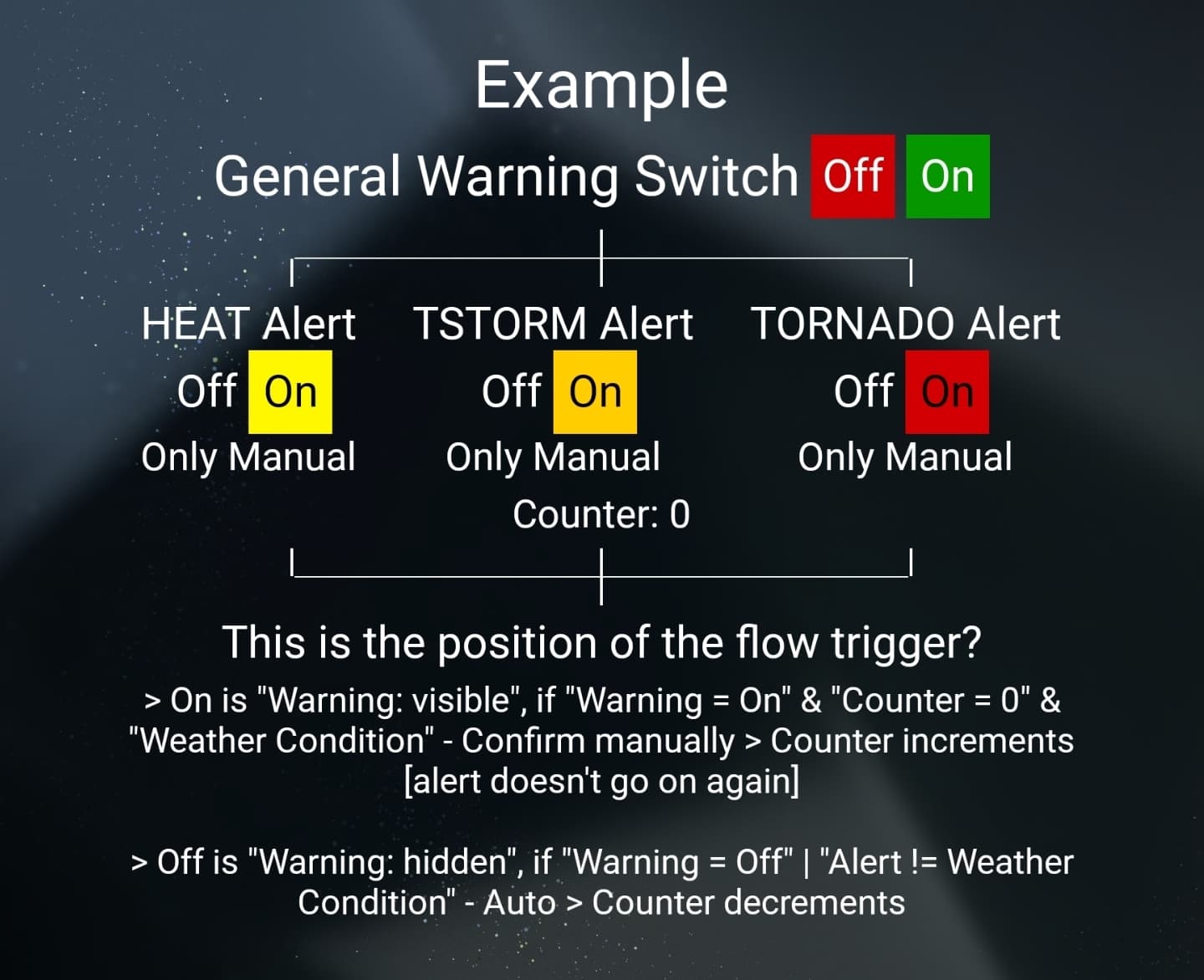
Here’s my plan again in detail…
I have a switch for general warning [On/Off].
For the first one, I created three more switches (alerts): heat, storm, and tornado. I use a confirmation button to increase the counter to 1 so that the corresponding alerts goes off. This button then disappears. My manual refresh button reappears. If another scenario occurs in the meantime, I increase the counter to 2. Currently, I always use the refresh button to check if the state has changed. If one scenario is no longer active, the counter goes one down. I think I’ll go to a maximum of three scenarios per day. So, the maximum counter will be three in the end.
I then picked the heat alert for the thread because the maximum temperature applies for the entire day. I chose the heat alert as an example for this thread because the maximum temperature applies for the entire day.
Hi there
Do you have any screenshot of the widget you are working on?
 I am sorry but I kinda lost in your explanation, I tried to digest your explanation but it’s a bit confusing to me.
What is the main goal or the purpose of the widget?
I’ll try again to understand your explanation.
I’m 95% finished with the design. Unfortunately, I don’t want to upload a screenshot because someone might copy it.
I’m new to KWGT. I’m a beginner programmer. I don’t understand everything yet. I’d like to better understand the function of the Flow Trigger, for example, when it’s best to use it.
I want to display alerts in the widget. These can be turned off with confirmation.
Additionally, I’m also German. My English isn’t that good.
Hi there,
Please don’t misunderstand, it’s not about your English, I was trying to digest the workflow of your widget (on the image and your explanation).
Correct me if I’m wrong about the workflow:
- The General Warning switch is a manual trigger.
- When the General Warning switch is ON, then one of those 3 alerts will show (depending on the current weather condition).
Is that the goal you want to achieve with the widget?
The “General Warning Switch” is a “Manual Switch”. No trigger. The alerts only work when this is turned on. I can turn it on and off in the widget settings I created. If it’s off, nothing is displayed. The alerts don’t work.
A comparison with the light. General Warning turns on the light in the background. The alarms are SOS signals that appear when something happens.
Text examples: “There’s a thunderstorm threatening this evening.” “Heat warning! It’ll be over 35°C this afternoon.”
Hi there,
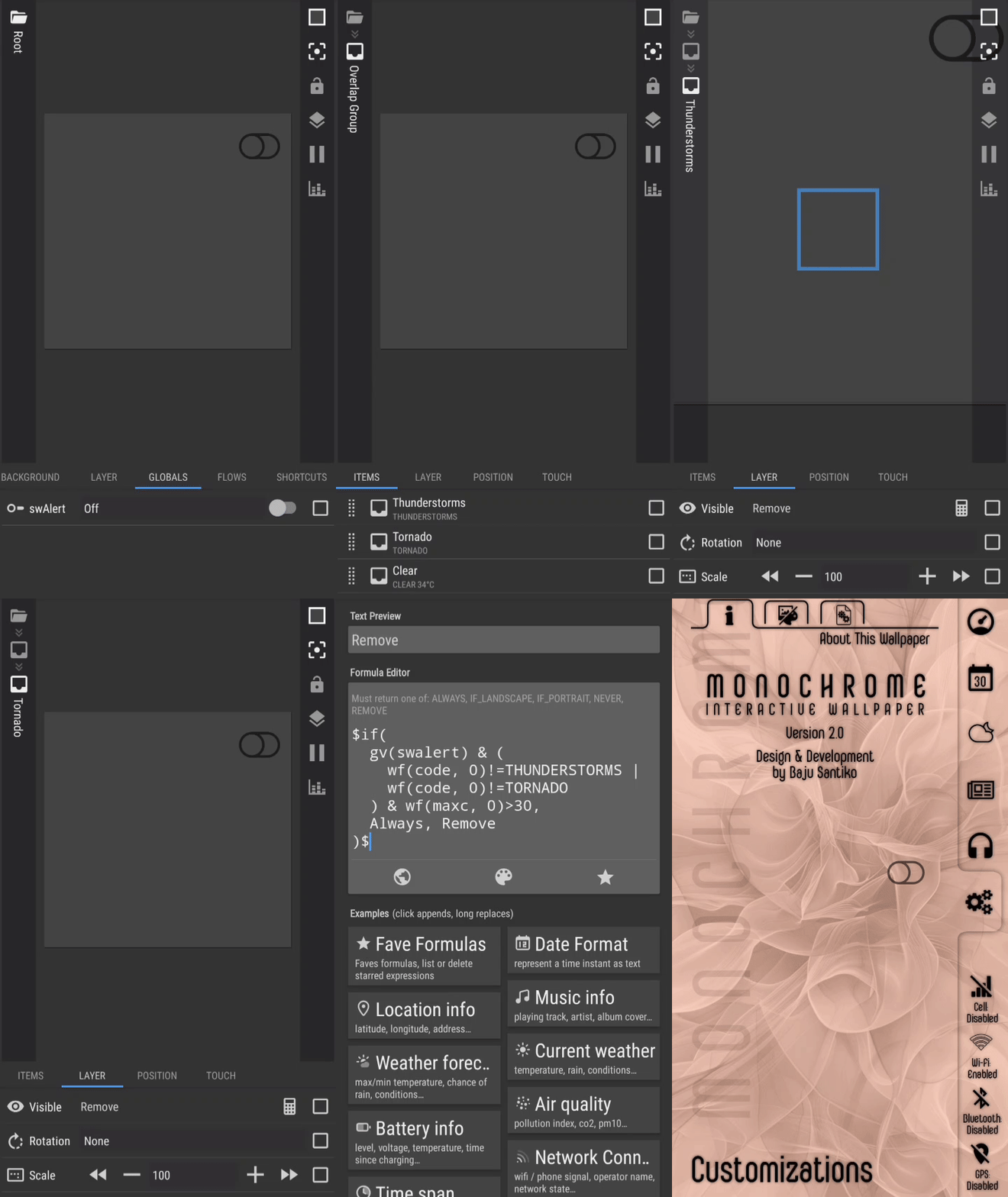
I just created an example KWGT widget based on what you described in the latest reply here.
- Download my Weather Alert example.
- Rename the downloaded widget file, remove the
.zip at the end of the filename.
- Move the renamed widget file (the
.kwgt file) to the widgets folder under your Kustom installation folder (for example: /Kustom/widgets).
- Add a new widget from your homescreen, and select the widget file (my Weather Alert widget file).
NOTES
- In my example, I added 3 weather conditions but you can add more as many as you want.
- In every weather condition, I just used 1 Text object with a static text but you can modify it and use formula to customize its text. Also, you can add more objects like an Icon object for weather icon or other Text object(s).
I hope this would help.
That’s the simple solution. 
I’ll try to create it using a different design. Then I’ll upload it. I just want to know if the flow trigger has the same functions as a switch toggle, but can do much more. Query the state and execute activities. The switch can only query.
I understand it as if the flow trigger is a switch upgrade.
You have the Pro Version?
I can sent you the export file?

My Weather Alert example didn’t even use a Flow, since it wasn’t needed.
It is just a base template for you to explore, to expand, and to adopt to your widget.
Good luck, my friend!
Yes, I am using KWGT Pro.