Hi, first time user of KWGT, must say pretty neat app!
Hope we could resolve the following problem:
I have configured a simple flow, that should trigger every 2min to fetch some json data into global variable “json”.
Flow config:
-
Cron (*/2 * * * *)
-
Delay 1 sec
-
Web Get
-
Set Global Var
-
Delay 1 sec
Data returned is in form {“Prop1”: “##.##”, “Prop2”: “##.##”, “tsunix”: “unixtimestmap_seconds”}
Everything works great in “Test Flow”. I am saving each property in global variables and displaying them on widgets and notification. In addition I display timespan from last “tsunix” with $tf(gv(tstdat))$ as seen on attached images. “tstdat” is global variable date parsed from “tsunix”.
So the widgets and notifications update each minute, and $tf$ function increments as it should (it displays “1 min ago, 2 min ago, 3 min ago”).
But the flow does not execute every time as the json “tsunix” property can be unchanged for 20min, or sometimes 6 hours.
Normally Notification data is updated more frequently than Widgets data and both display $tf$ as should.
How to solve so that flow will be triggered more consistently?
KWGT version: 3.81b530915
Phone: Galaxy Ultra24, One UI 8.0, Android 16.
I followed instructions for whitelisting app on How to whitelist Kustom from Battery Optimization | Kustom HQ
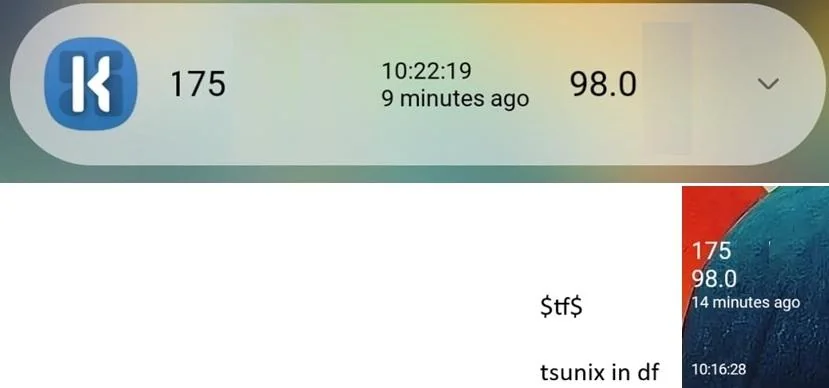
Notification and widget. It should trigger every 2min. Notification flow data get was last triggered 9 min ago and widgets 14 min ago. Both were updated in 1 min intervals as $tf$ output increments.