H🌝ello,
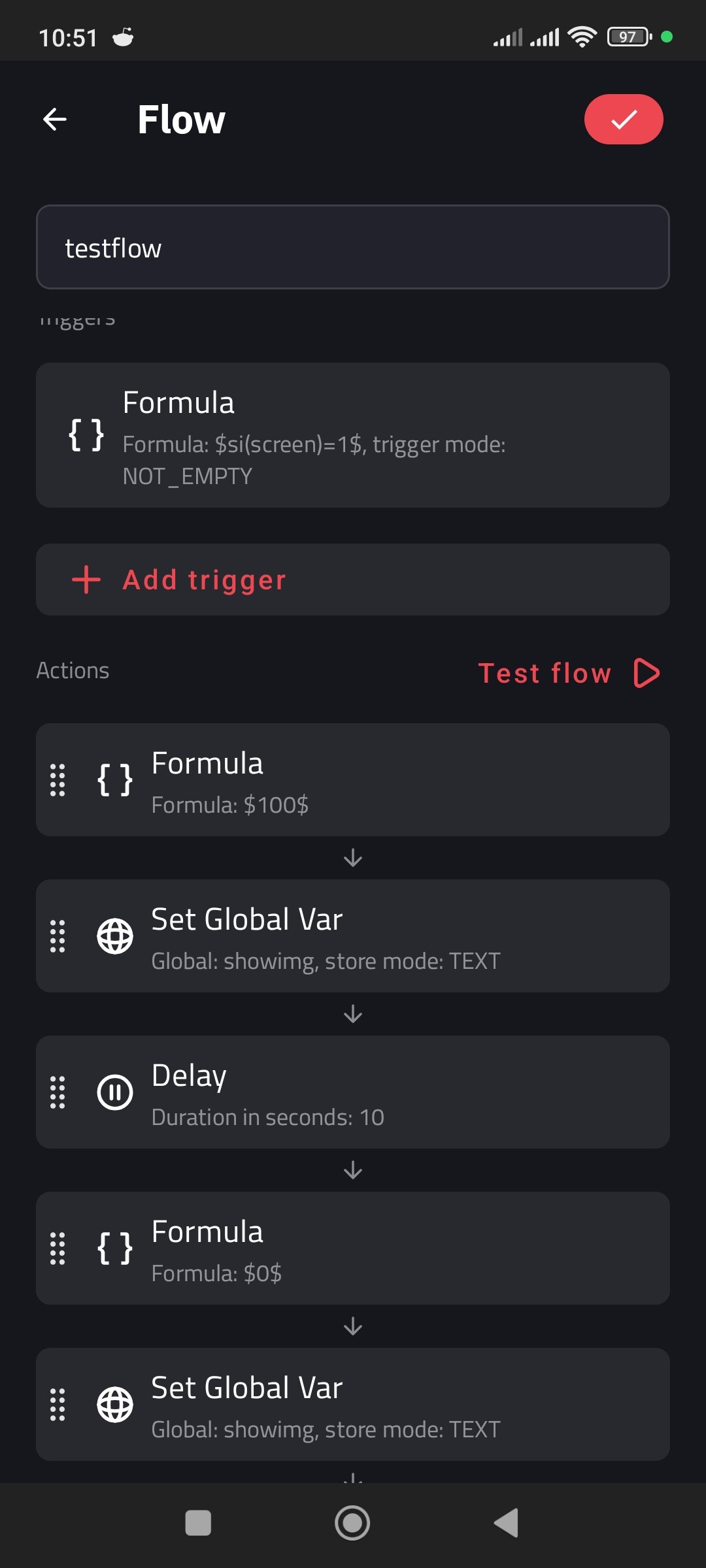
I’m trying to build a very specific behavior in KLWP using 4 independent images, whose visibility is controlled only via opacity.
 General goal
I have 4 images, and only one image must be visible at a time, never more than one.
 Desired behavior
 When I am on the home screen (screen = 1)
No image should appear “out of nowhere”
If an image was already visible before I arrived on the home screen, it stays visible when I arrive
When I arrive on the home screen, a 10-second timer starts
After 10 seconds, the currently visible image disappears
While I stay on the home screen:
No other image should appear
Image selection (random or sequential) is completely frozen
 When I leave the home screen (screen = 0)
One image out of the 4 becomes visible at the exact moment I leave the home screen
I do not see the image appear (it appears while I’m outside the home screen)
Only one image is visible at a time (out of the 4)
This image stays visible as long as I don’t return to the home screen
When I come back to the home screen, this image:
Stays visible
Continues until the 10-second timer finishes
Then disappears
 Full cycle logic
Every time I leave the home screen, a new image (random or sequential) is selected
This image is displayed when I leave the home screen
While I remain on the home screen, no new selection must occur
 Important constraints
Only one image visible at a time
No image overlap
Image appearance must happen outside the home screen
The 10-second timer starts only when arriving on the home screen
Visibility is controlled only via opacity
I use si(screen) to detect home screen vs other screens
 What I’ve already tried
Global List
Global Number
df(ss) for time handling
tu(seq)
Opacity formulas depending on screen
But I can’t manage to:
Freeze image selection while staying on the home screen
Prevent any image change or appearance while on the home screen
Correctly start the 10-second timer only when arriving on the home screen
 My question
What is the correct KLWP structure / logic to:
Have only one image visible out of 4
Make an image (out of the 4) become visible when leaving the home screen
Keep that image visible when returning to the home screen
Trigger a 10-second timer on arrival to the home screen, after which the image disappears
Prevent any new image appearance or change while staying on the home screen
Restart the image selection (random or sequential) only after leaving the home screen again
Any help, global logic, or example KLWP setup would be greatly appreciated 
In french:
 [KLWP] Afficher 1 image parmi 4 en quittant l’écran d’accueil, puis la cacher après 10 secondes
Bonjour,
J’essaie de mettre en place un comportement précis dans KLWP avec 4 images indépendantes, dont la visibilité est gérée uniquement par l’opacité.
Objectif général
J’ai 4 images, et une seule doit être visible à la fois, jamais plusieurs en même temps.
Comportement souhaité
Quand je suis sur l’écran d’accueil (screen = 1)
Aucune image ne doit apparaître « de nulle part »
Si une image était déjà visible avant mon arrivée sur l’écran d’accueil, elle reste visible à mon arrivée
À mon arrivée sur l’écran d’accueil, un compteur de 10 secondes démarre
Au bout de ces 10 secondes, l’image visible disparaît
Tant que je reste sur l’écran d’accueil :
Aucune autre image ne doit apparaître
La sélection d’image (aléatoire ou séquentielle) est complètement figée
Quand je quitte l’écran d’accueil (screen = 0)
Une image parmi les 4 devient visible au moment où je quitte l’écran d’accueil
Je ne vois pas l’apparition de l’image (elle apparaît hors écran d’accueil)
Une seule image est visible à la fois (parmi les 4)
Cette image reste visible tant que je ne reviens pas sur l’écran d’accueil
Lors du retour sur l’écran d’accueil, cette image :
Reste visible
Continue jusqu’à la fin du compteur de 10 secondes
Puis disparaît
Cycle complet
À chaque départ de l’écran d’accueil, une nouvelle image (aléatoire ou à la suite) parmi les 4 est sélectionnée
Cette image sera affichée au moment où je quitte l’écran d’accueil
Tant que je reste sur l’écran d’accueil, aucune nouvelle sélection ne doit avoir lieu
Contraintes importantes
Une seule image visible à la fois
Aucune superposition d’images
L’apparition de l’image doit se faire hors écran d’accueil
Le compteur de 10 secondes démarre uniquement à l’arrivée sur l’écran d’accueil
La visibilité est gérée uniquement par l’opacité
J’utilise si(screen) pour détecter écran d’accueil / autres écrans
Ce que j’ai déjà essayé
Global List
Global Number
df(ss) pour la gestion du temps
tu(seq)
Formules d’opacité dépendantes de screen
Mais je n’arrive pas à :
Bloquer la sélection d’image pendant que je suis sur l’écran d’accueil
Empêcher tout changement ou apparition d’image tant que je reste sur l’accueil
Lancer correctement le compteur de 10 secondes uniquement à l’arrivée sur l’écran d’accueil
Ma question
Quelle est la bonne structure / logique dans KLWP pour :
Avoir une seule image visible parmi 4
Faire en sorte que l’image (parmi les 4) devienne visible au moment où je quitte l’écran d’accueil
Conserver cette image visible lors du retour sur l’écran d’accueil
Déclencher un compteur de 10 secondes à l’arrivée sur l’écran d’accueil, au terme duquel l’image disparaît
Empêcher toute nouvelle apparition ou changement d’image tant que je reste sur l’écran d’accueil
Relancer la sélection (aléatoire ou séquentielle) uniquement après avoir quitté à nouveau l’écran d’accueil
Toute aide, logique globale ou exemple de configuration KLWP serait vraiment apprécié


 !
! .
.