In this trivial example the local variable should be x = 10 after the loop just like “i”, but it seems it is changed only once…
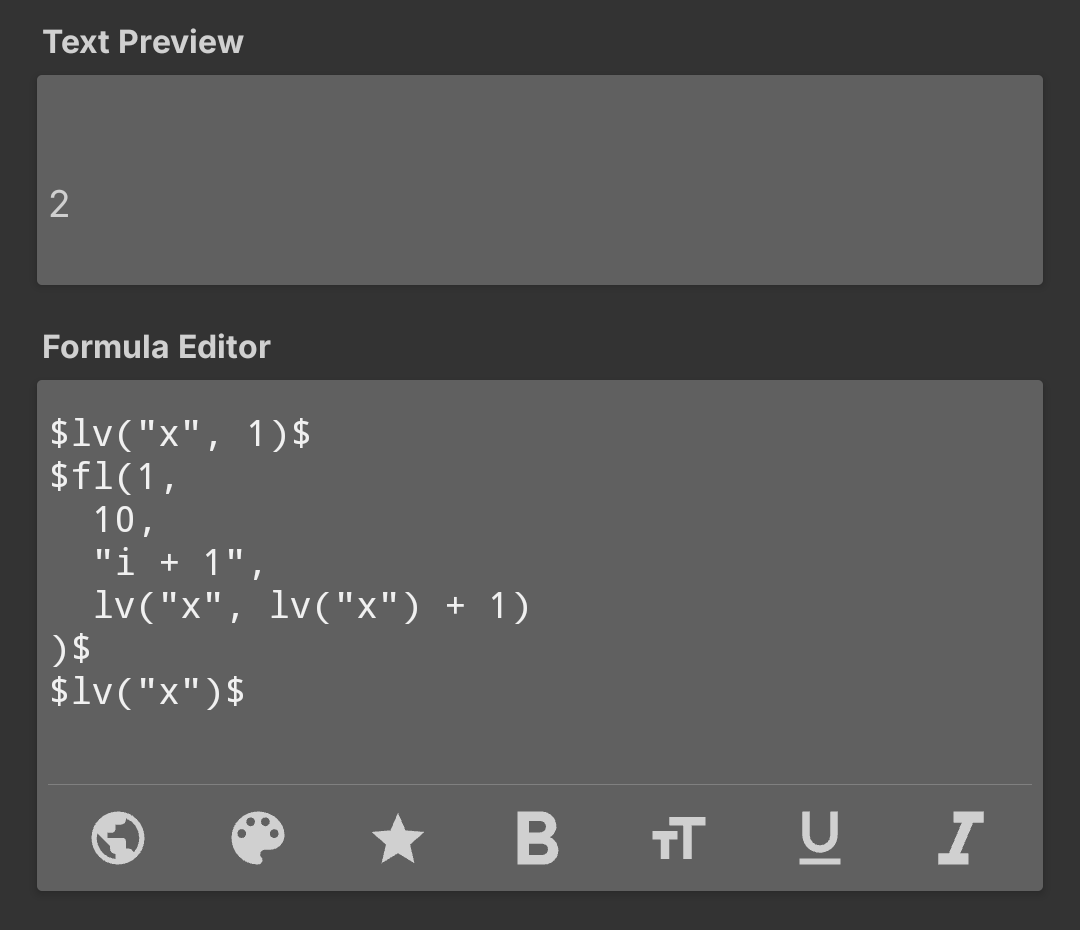
In real programming languages this kind of loop and variable update would work.
But Kustom is not procedural, so fl() can’t update variables on each iteration.
It only repeats an expression for output, and lv() is evaluated once in the same context.
That’s why cumulative logic doesn’t work here Kustom simply isn’t built for it.
If you need math accumulation, it has to be done outside fl().
Thanks for the reply. Understood the limitation, now the question is how could I implement a function that for e.g. goes through days from today to a specific date and counts the days with all day events in the calendar…
I’d recommend using Tasker for this.
Or parsing an external JSON if you have one.
But the fastest and most reliable option is definitely Tasker.
fl() isn’t a loop statement, it’s a function. It expects a formula string as the loop body argument, and it then parses and evaluates that formula string. Your lv() call is not in a string, and so before fl() runs, lv(x, lv(x) + 1) is evaluated, resulting in 2 being stored in local x, and your loop body argument being an empty string. The loop then prints an empty string 10 times, and you finally read local x, which is still 2.
So, to actually make this happen: For syntax, you can use #x to read the local, and you don’t need quotation marks around x, you can leave it quoteless. You’ll also, unfortunately, run into this bug:
Working with all of that:
$fl(1, 10, "i+1",
    "lv(x, if(i = 1, 1, #x + 1)) + if(i = 10, #x)"
)$
Notice that the entire loop body is a string, and 1, the value for the first iteration, is resolved inside fl(), to work around the bug - also, the final result is returned from the final iteration, because apparently variables don’t smothly transfer out of loops either. It’s a mess.
If you needed to use quotation marks inside the loop body, you can concatenate them using + tc(utf, 22) +, or use a placeholder like ' and then replace that placeholder with tc(reg, "loop + ' ' + body", ', tc(utf, 22)).
If you’d like to learn more about formulas:
This is confidently stated false information, see my post above. It works if you do it correctly, it’s just finnicky and buggy.
Thanks for the detailed breakdown! This is some next-level Kustom sorcery right there. 
You’re absolutely right about how fl() evaluates the body string, but .. looking at that syntax with placeholders and tc(utf, 22) just to pass a variable… it feels like performing heart surgery through a straw.
I still think that for 99% of users (and for the sake of my own sanity), using Tasker for complex logic is a much cleaner way to go. But it’s great to know that it is technically possible if you’re brave enough to fight the bugs!
Respect for the deep dive! 
Yeah having an actual programming language certainly makes implementing complex logic easier, I’ll give you that lol
This would be much simpler if:
lv()interacted properly withfl()- you could escape
"by doing\"-"string \"with quote\" inside" - or you could use
'or"for strings -'string "with quote" inside'(like in JS) - or we had an actual loop statement in the language instead of evaluating a formula string
But alas for now we’re stuck doing sorcery, unlucky :I
Example for counting all all-day events for the current month:
$lv(month, a0M) +
fl(0,0,0,
    fl(0, df(o, #month) - 1, "i+1",
        "ci(acount, " + #month + "0da + i + d)",
        "+"
    )
)$
a0M is the variable controlling which month to do this for, by default current month. If you wanted to only start counting from today, in the inner loop you could replace 0 with df(d) - 1.
Explanation:
- Loop through all days of the given month and return the count for that day.
- Concatenate all these counts into one string separated by
+(ex.12+41+4+0+4+...). - Evaluate that string as a formula using
fl(0,0,0, [formula string]).
That’s a brilliant example of thinking outside the box! Using a nested fl() to evaluate a generated string.
It’s a shame we have to resort to such ‘sorcery’ for things that would take two lines of code in a proper environment, but your explanation really clears up why it’s so finicky.
I’ll definitely keep this trick in my arsenal.
Holy Batman, that is some hardcore stuff. Yeah I thought that this “language” will have serious limitations and it seems it does need some heavy hacking in some areas. Thank you so much taking your time to show these tricks!
I’ve been banging my head against the wall trying to get $fl()$ to behave like a traditional for-loop with variables. Your logic for handling the local updates is a total life-saver for complex setups.