Hi,
I have noticed that some icons imported from iconify through the kustom apps are displayed with additional svg points and different fills than what is displayed in the iconify preview or other apps.
Here are a couple of examples I have noticed within the IconaMoon and MingCute packs. I am comparing the icons displayed by an icon object with the iconify preview within the kustom app (edited in).
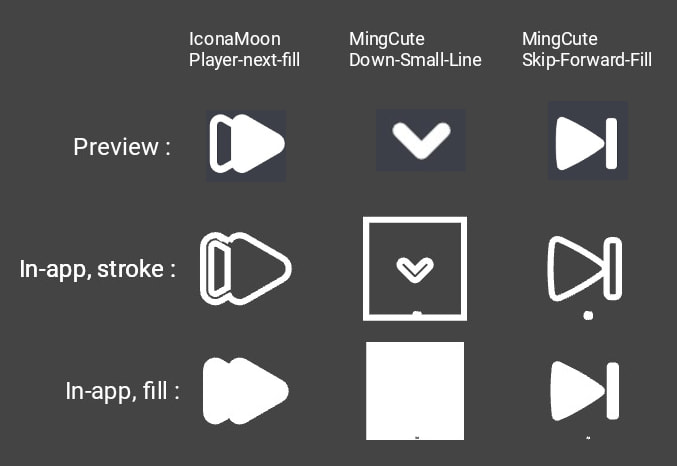
As you can see, the IconaMoon arrows and Mingcute downards arrow get filled in places they shouldn’t. The mingcute set also consistently has a double quote pattern visible on the bottom of every icon, and the downard arrow is an extreme case with a full square visible in the strokes.
I wanted to confirm whether this would happen when importing these icons through a .ttf font, following the documenation : Font Icons and SVG Icon Packs | Kustom HQ
but I have been unable to get kwgt to recognize any ttf icon pack.
However, I believe I have also noticed this issue with some system fonts’ glyphs, though I do not remember which and have not been unable to reproduce it.
I can reliably reproduce this issue in both kwgt and klck v3.81, android 13. I have not tried on any other setup.