I had just finished creating a photo slider widget in Kustom Widget Free when I exited the app without saving my progress, and now I can’t redo it. Is there any way to recover it? I’m using the free Brazilian version.
You can export and save your work, but you cannot import it back on the free version. Next time, just make sure to hit the save icon before exiting.
I have a Pro account and Saved, Exported and it went away but I can find the files that show the images, but I open them there’s a message about something being re-saved, more like erased and nothing appears in the editor.
I get pissed every time I come across the App or look at my empty Desktop.
It’s just a tip: use a file manager to manually move your .kwgt / .klwp files into the Kustom/widgets or Kustom/wallpapers folder, and then open them directly from the Library.
How do you get KWGT to open to the Library? When I launch the app, it opens to “Available Spaces”, and when I click back, it just exits the app. This “back” behavior is super annoying, as I hit back and exit the app when I’m just trying to back out of an item. The only way to launch into Library for me is to create a brand new empty Widget, and then tap is to populate. That’s the only time it opens to Library. The app seems to have a lot of these strange unpredictable behaviors.
KWGT needs to know the layout and size context before opening the library. You have two options: either create a new widget slot (Space) on your homescreen first and then tap it to load a preset, or tap on an already existing widget on your screen to edit it.
Not very intuitive. I still struggle with the back button closing the app constantly. I supposed I’ll get used to it. The tool itself is insanely powerful. I wish there was a way to distribute like Facer or WatchMaker, but for Widgets. There’s a pretty big boat being missed here.
Thanks. But it didn’t work because there’s only the Kustom folder and that’s it. The folder you described isn’t there.
Here are the default folders under the Kustom installation folder.
In the following screenshot, I use the default Kustom installation folder in the phone/internal storage.
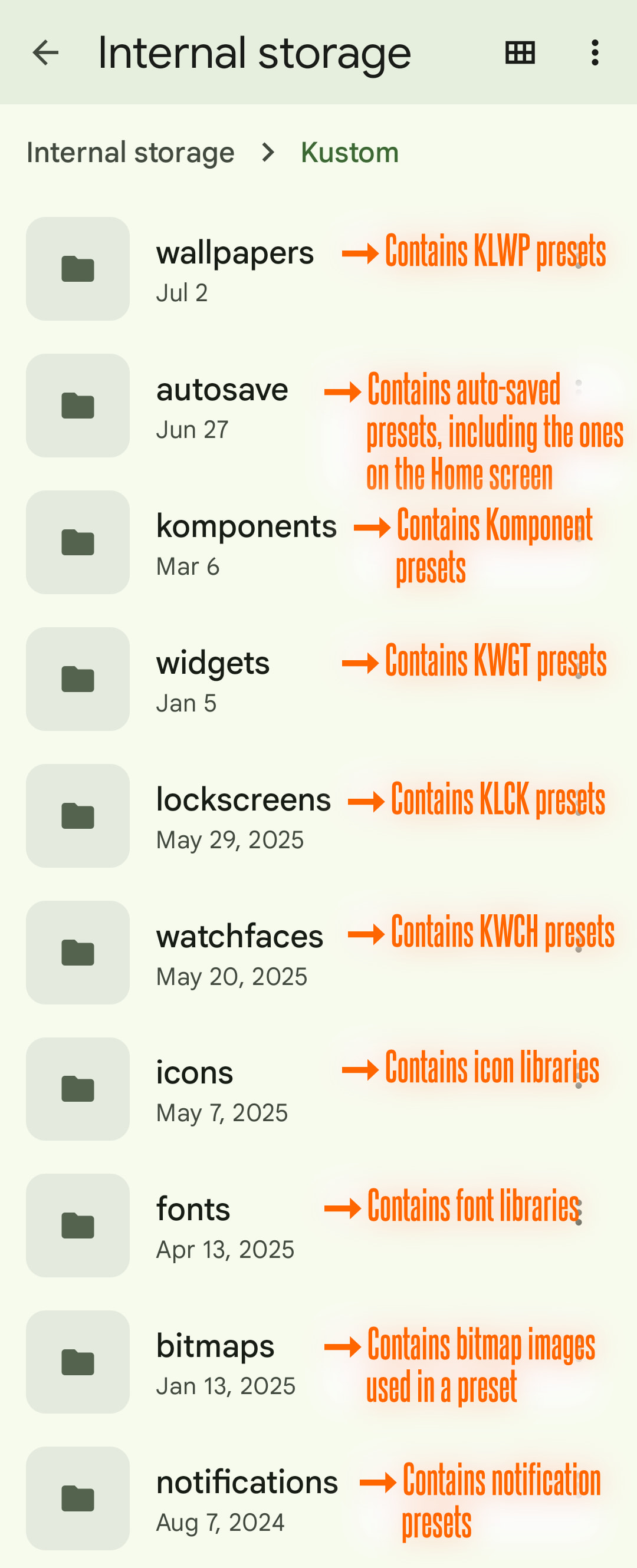
Your Kustom installation folder may be located in a different storage and/or under a different parent folder.
TIPS
- Use a file manager app to search one of the folders (shown in the above screenshot), in order to locate your Kustom installation folder.
I hope this would help.


I agree with @MaxP on this.
I never use the IMPORT feature from any KLWP, KWGT, or KLCK apps. Instead, I simply copy or move the preset file(s) from my backup storage to the appropriate folder (under the Kustom installation folder).
I hope this would help.