I have a few GIFs I added the colorise option to and they work fine in the editor. On my home screen though, they show as the colour set in the colorise option for a second, and then switch back to their default colour(s)
Would you mind sharing a screenshot showing the issue on your KLWP preset?
Thanks.
Sure thing.
Here’s a screen recording and some screenshots
No, I’m not trying to make it fade out or filter in or anything like that. I’m trying to change the colour of the gif via ‘Filter’ and ‘Colorize’. It works in the editor, but not on the homescreen
I totally get it! Keep your Filter and Colorize settings exactly as they are.
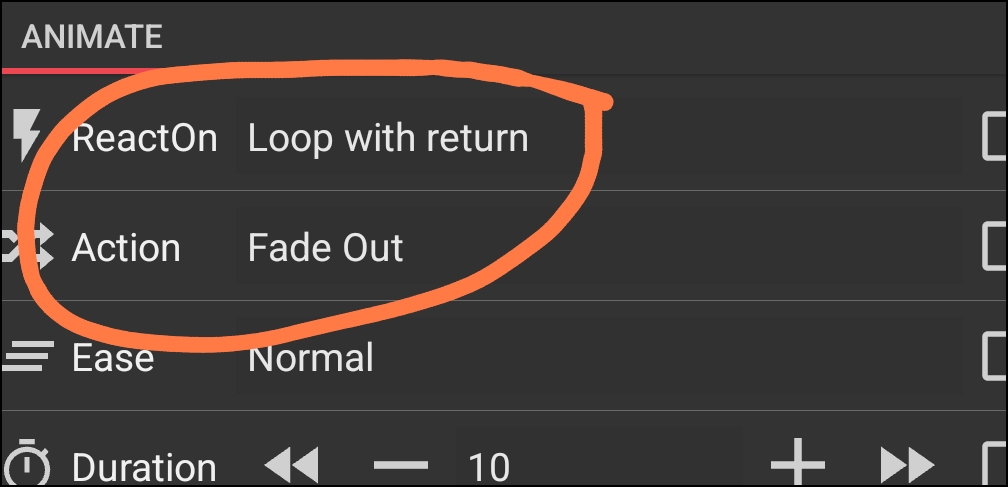
Just add this animation to your gif and check the result:
React on: Loop with Return
Action: Fade Out
Sorry no, that’s not it.
I don’t want the gif to fade out and in and out on return. There are icons to bring each gif into view, but when each one is brought into view, the color which is set in the Colorise option only stays for a second before the gif goes back to its original colour
The reason your color disappears is that KLWP tries to save battery on the homescreen by bypassing the ‘Colorize’ filter on GIF objects. It sees the GIF as a static video stream and ignores your settings.
When you add a Fade Out animation with Amount: 1, two things happen:
Visually: The GIF stays 99% solid. Your eyes won’t see any fading at all.
Technically: You force the phone’s GPU to process every frame to calculate that 1% transparency.
Because the GPU is now forced to work on the GIF, it finally applies your Colorize filter correctly on the homescreen.
Just try it: Loop with Return / Fade Out / Amount: 1. After you apply this, check if the GIF keeps the new color on your homescreen and let me know if it works for you. I’m not forcing you to do it, I just want you to try this 10‑second test.
Ahhhh, ok, now it makes sense with the explanation 
Tried it. It works, but unfortunately, when the GIF loop repeats, it flashes back to its original colour for a split second
Wondering now why Filter>colourise is an option for GIFs if it isn’t going to work
Great  Yeah, I was just too lazy to write a long explanation, so I wanted you to simply test it. I just fixed the flashing! Here is the ultimate ‘Invisible Animation’ setup for the GIF to stay colored without any glitches:
React on: Loop
Action: Fade Out
Amount: 0
At least in my test there are no flashes at all.
Eureka. Loop instead of loop with return works perfectly. No blinking back to its normal colour
Fantastic
Thanks for the help 
Happy to hear it all worked out 
I’ve seen this happen before where the filter just doesn’t seem to ‘stick’ outside the editor. One weird workaround that sometimes forces Kustom to keep the color is adding a tiny, invisible animation to the GIF (like a 1% fade or a loop that doesn’t actually move anything). It seems to keep the rendering engine ‘awake’ so it doesn’t default back to the original colors.