Extract text from global variable

I have this part of a text in a global variable ‘nasatxt’:

...
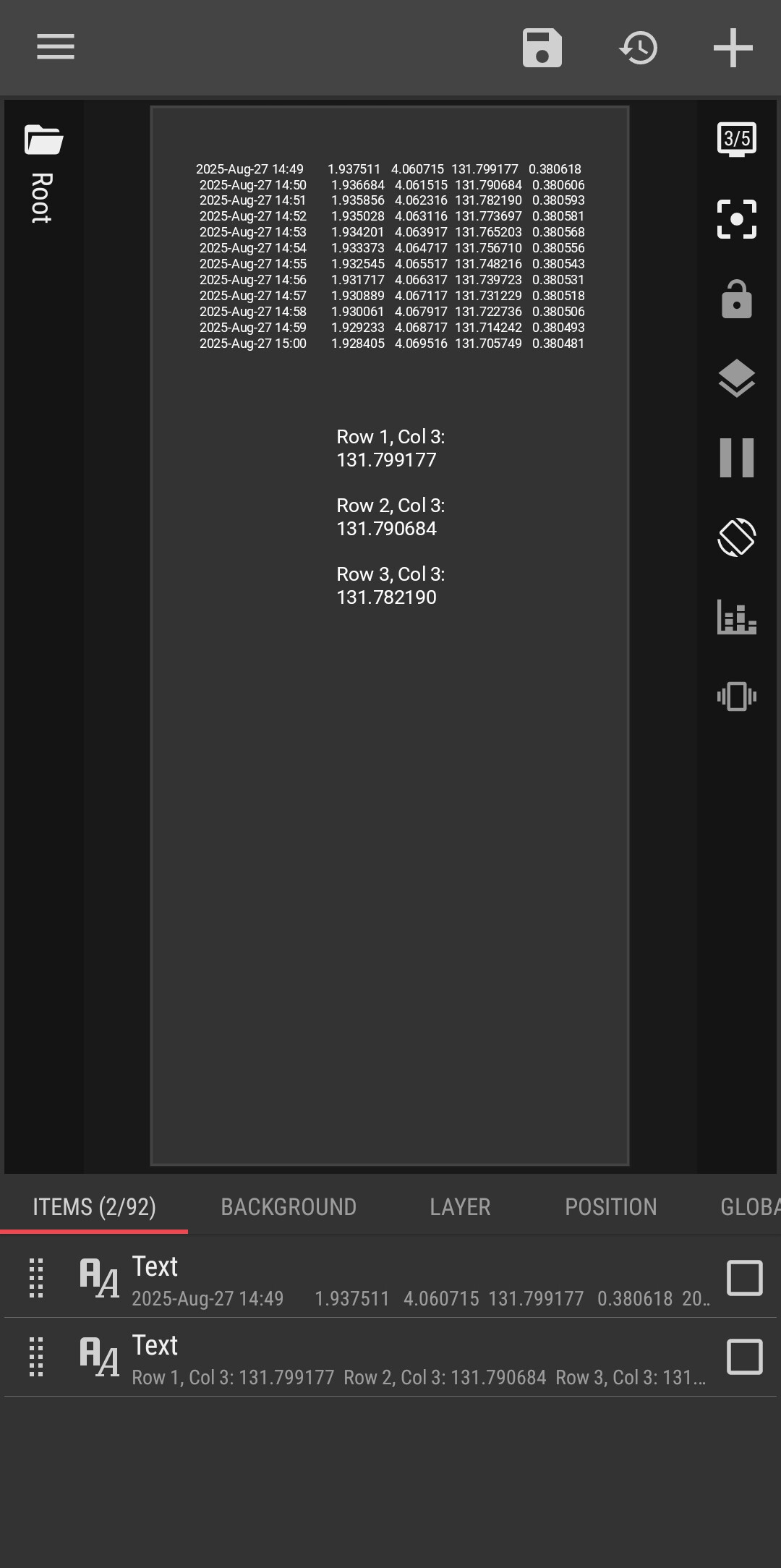
 2025-Aug-27 14:49       1.937511   4.060715  131.799177   0.380618
 2025-Aug-27 14:50       1.936684   4.061515  131.790684   0.380606
 2025-Aug-27 14:51       1.935856   4.062316  131.782190   0.380593
 2025-Aug-27 14:52       1.935028   4.063116  131.773697   0.380581
 2025-Aug-27 14:53       1.934201   4.063917  131.765203   0.380568
 2025-Aug-27 14:54       1.933373   4.064717  131.756710   0.380556
 2025-Aug-27 14:55       1.932545   4.065517  131.748216   0.380543
 2025-Aug-27 14:56       1.931717   4.066317  131.739723   0.380531
 2025-Aug-27 14:57       1.930889   4.067117  131.731229   0.380518
 2025-Aug-27 14:58       1.930061   4.067917  131.722736   0.380506
 2025-Aug-27 14:59       1.929233   4.068717  131.714242   0.380493
 2025-Aug-27 15:00       1.928405   4.069516  131.705749   0.380481
...

Codes suggested by ChatGPT and Gemini do not work:

$tc(reg, gv(nasatxt), "2025-Aug-27 14:56\s+(\S+)\s+\S+", "$0")$
$fl(tc(split, gv(nasatxt), "\n"), "i", "if(i ~ """ + "2025-Aug-27 14:56" + """, i, """")")$

Ultimately, I would like to extract the 4 numbers on each line separately, and dynamically with a

 df(yyyy-MMM-dd HH:mm)

Can anyone point me to a correct way of doing this?
Hi there,

Could you please tell me what is the 4 number like? Any example from the invite text?

@JVDH

Hi James,

If you want to get the 3rd column from your nasatxt global variable, try these steps.

  1. Create a Text global variable to grab all the 3rd column data from the nasatxt global variable. Let’s say its name is: 3rdcol
  2. Type this code snippet into the 3rdcol variable:

$tc(reg,tc(reg,gv(nasatxt),"([0-9]{4}\-[A-Za-z]{3}\-[0-9]{1,2}[\s\t]+[0-9]{1,2}\:[0-9]{1,2})(([\s\t]+[0-9.]+){2})(([\s\t]+)([0-9.]+))(.*[\n\r]*)","$6"),"[\n\r\s\t]+","|")$

  1. Create a new Text object, type this code snippet into it: $tc(split,gv(3rdcol),"|",0)$ ➞ get the first value from the 3rd column data.

I hope this would help.
Did you find the most helpful response to your issue?
Please kindly press the :check_box_with_check: Solution button to mark it as the solution.
This would help others with the similar issue.

:smiling_face::+1:

Just to clarify further, the selection of the separate line needs to be done dynamically with

df(yyyy-MMM-dd hh:mm)

Lets say that
df(yyyy-MMM-dd hh:mm) = 2025-Aug-27 14:56
the line would be:

2025-Aug-27 14:56 1.931717 4.066317 131.739723 0.380531

After that I need value 1, 2, 3 and 4 from that line:

1.931717
4.066317
131.739723
0.380531

The numbers change every minute, and I would like use the 4 number from each line and time to make some calculations.

Hi James,

Did you mean you need get all the 4 numbers from each row?

Yes, I need all 4 numbers.
Probably best to put them in 4 different local variables.

A question:
Do you need to get just 1 line of data every minute?

Yes, I need the values of the 4 numbers that correspond with the actual time. In this case every minute.

The frustrating thing is that this regex works on https://regex101.com/ :

2025-Aug-27 14:56\s+(\S+)\s+\S+

and returns Group 1:

1.931717

So I don’t know what is wrong with this code, and why it does not work in KWGT :

$tc(reg, gv(nasatxt), "2025-Aug-27 14:56\s+(\S+)\s+\S+", "$1")$

Hi James,

I have created a Table Parser to parse the nasatxt raw data.

Here is the screencast:
TIPS • Table Parser

NOTES

  • Add a Text global variable for parsing the raw data, to get the line that match to the current time. Let say its name is: currdata.

  • Insert this code snippet into the currdata:
    $lv(datetime,df("yyyy-MMM-dd hh:mm",gv(datetime))) $$lv(data,tc(reg,tc(reg,gv(nasatxt),"("+#datetime+"[\s\t]*)(([0-9\.]+[\n\r\s\t]*){4})([\n\r\s\t\.\:\-0-9A-Za-z]*)","~$1$2~"),"[\s\t]{2,}","|"))$$if(tc(count,#data,"~")>0,if(tc(split,#data,"~",1)!="",tc(split,#data,"~",1),tc(split,#data,"~",0)))$

  • Add 5 more Text global variables, to get the data from each columns:

    • Date : the date from COLUMN 1
      $if(gv(currdata)!="",if(tc(count,gv(currdata),"|")>=0,tc(split,gv(currdata),"|",0)))$

    • Data1 : the number from COLUMN 2
      $if(gv(currdata)!="",if(tc(count,gv(currdata),"|")>0,tc(split,gv(currdata),"|",1)))$

    • Data2 : the number from COLUMN 3
      $if(gv(currdata)!="",if(tc(count,gv(currdata),"|")>1,tc(split,gv(currdata),"|",2)))$

    • Data3 : the number from COLUMN 4
      $if(gv(currdata)!="",if(tc(count,gv(currdata),"|")>2,tc(split,gv(currdata),"|",3)))$

    • Data4 : the number from COLUMN 5
      $if(gv(currdata)!="",if(tc(count,gv(currdata),"|")>3,tc(split,gv(currdata),"|",4)))$

:smiling_face::+1:

Impressive!
Do you mind sharing how you achieved this?

Hi James,

I updated my reply above for additional details, please take a look.

I hope this would help.
Did you find the most helpful response to your issue?
Please kindly press the :check_box_with_check: Solution button to mark it as the solution.
This would help others with the similar issue.

:smiling_face::+1:

Holy ****, dude, you are so good with these things and so fast!
Hats off to you! :person_bowing:

1 Like

Hi Ron,

I just tried to help as far as I know the solution.
:folded_hands: :smiling_face:

I totally agree with RonC!

Unfortunately, the text preceeding the line(s) I need trips up the regex. My result is:

2013|

I’m pulling the full version of ‘nasatxt’ from here:

https://ssd.jpl.nasa.gov/api/horizons.api?format=text&COMMAND=%27301%27&OBJ_DATA=%27YES%27&MAKE_EPHEM=%27YES%27&EPHEM_TYPE=%27OBSERVER%27&CENTER=%27500@399%27&START_TIME=%272025-08-29%27&STOP_TIME=%272025-08-30%27&STEP_SIZE=%271%20m%27&QUANTITIES=%2714,15%27

The flow in KWGT, to update the global variable ‘nasatxt’, runs once a day with:

https://ssd.jpl.nasa.gov/api/horizons.api?format=text&COMMAND=%27301%27&OBJ_DATA=%27YES%27&MAKE_EPHEM=%27YES%27&EPHEM_TYPE=%27OBSERVER%27&CENTER=%27500@399%27&START_TIME=%27$df(yyyy-MM-dd)$%27&STOP_TIME=%27$df(yyyy-MM-dd, a1d)$%27&STEP_SIZE=%271%20m%27&QUANTITIES=%2714,15%27

I tried CrapGPT to update your code, but it screwed up again…

Hi James,

So, the raw data is updated on daily basis and not hourly basis?

Hmm…

The START_TIME to STOP_TIME of the API pull is a full day, and the STEP_SIZE is 1 minute. That could be changed to whatever is needed. But it will not make the junk info at the start of the text go away.

Hi James,

Since now I see the API’s URL, and I can see the whole/complete raw data, this makes the previous logics slightly changed, specifically the data parsing logics.

Now, here’s the update I have made.

TIPS • Table Parser 002
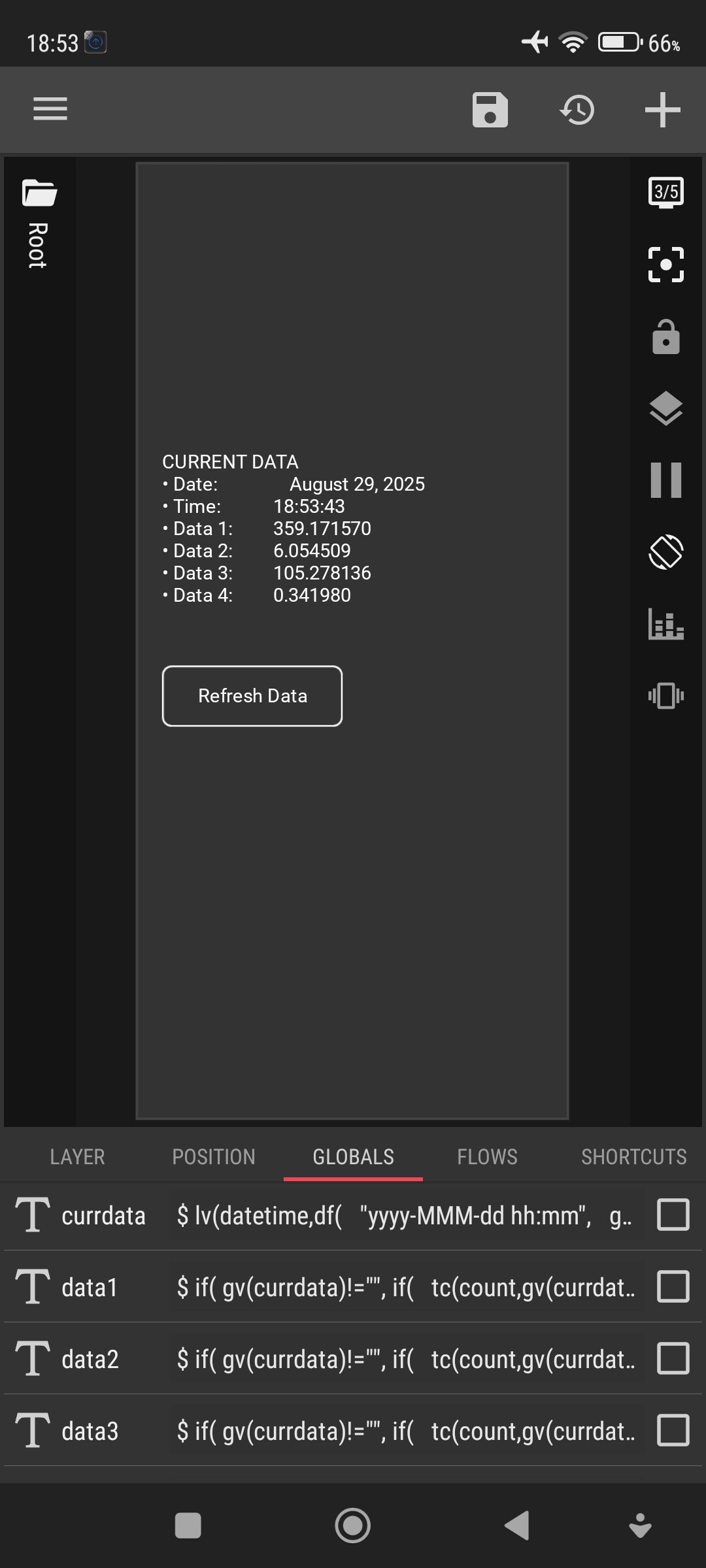
I intentionally display the second numbers, to show the automatic changes in between minutes.

Global variables

  • Add a Text global variable for parsing the raw data, to get the line that match to the current time. Let say its name is: currdata.

  • Insert this code snippet into the currdata:
    $lv(datetime,df("yyyy-MMM-dd hh:mm",gv(datetime)))$$lv(data,tc(reg,tc(reg,gv(nasatxt),"("+#datetime+"[\s\t]*)"+"(([0-9\.]+[\s\t]*){4})"+"([\s\t\.\:\-0-9A-Za-z]+)","~$1$2~"), "[\s\t]+", "|"))$$if(tc(count, #data, "~")>0,if(tc(split, #data, "~", 1)!="",tc(split, #data, "~", 1),tc(split, #data, "~", 0)))$

  • Add 5 more Text global variables, to get the data from each columns:

    • Date : the date from COLUMN 1
      $if(gv(currdata)!="",if(tc(count,gv(currdata),"|")>0,tc(split,gv(currdata),"|",0)+" "+tc(split,gv(currdata),"|",1)))$

    • Data1 : the number from COLUMN 2
      $if(gv(currdata)!="",if(tc(count,gv(currdata),"|")>2,tc(split,gv(currdata),"|",2)))$

    • Data2 : the number from COLUMN 3
      $if(gv(currdata)!="",if(tc(count,gv(currdata),"|")>3,tc(split,gv(currdata),"|",3)))$

    • Data3 : the number from COLUMN 4
      $if(gv(currdata)!="",if(tc(count,gv(currdata),"|")>4,tc(split,gv(currdata),"|",4)))$

    • Data4 : the number from COLUMN 5
      $if(gv(currdata)!="",if(tc(count,gv(currdata),"|")>5,tc(split,gv(currdata),"|",5)))$

The flow

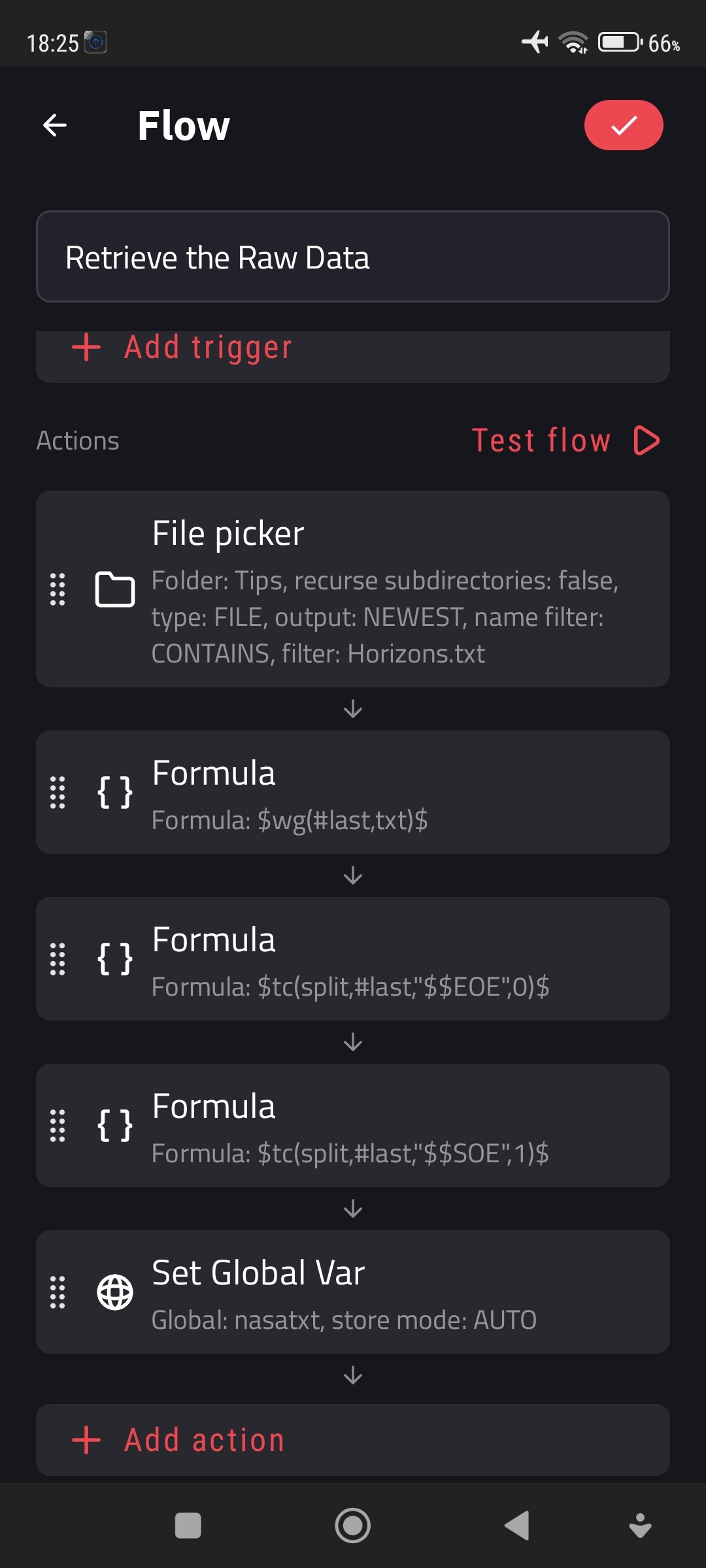
The flow is used to retrieve the raw data from an external text file, in this example: Horizons.txt

Currently, the flow trigger is only Manual. You can add a Cron trigger to periodically retrieve the raw data from the updated text file.

Here is a screenshot that show the list of global variables that is used.

I hope this would help.
:smiling_face::+1:

Hi James (@JVDH ),

I made a small update, to make the raw data updated directly from the API URL. So, there is no external text file needed for the raw data.

Add a global variable for the API URL, let say its name is: apiurl.

The value of this apiurl variable is:

https://ssd.jpl.nasa.gov/api/horizons.api?format=text&COMMAND=%27301%27&OBJ_DATA=%27YES%27&MAKE_EPHEM=%27YES%27&EPHEM_TYPE=%27OBSERVER%27&CENTER=%27500@399%27&START_TIME=%27$df("yyyy-MM-dd",gv(datetime))$%27&STOP_TIME=%27$df("yyyy-MM-dd",gv(datetime)+"a1d")$%27&STEP_SIZE=%271%20m%27&QUANTITIES=%2714,15%27

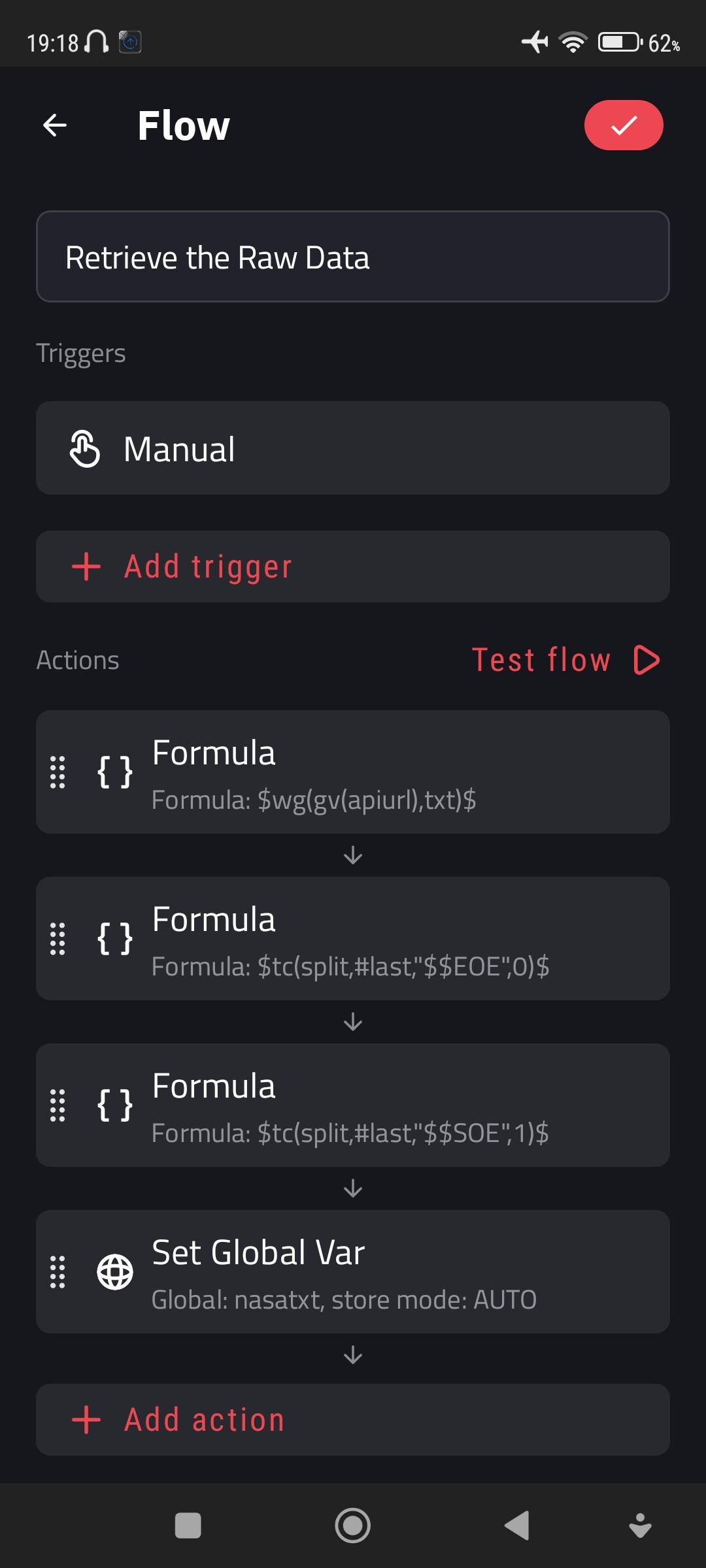
The flow

I hope this would help.
:smiling_face::+1:

Oh Boy!
Never thought something seemingly so trivial and straightforward would turn into this!

I had to do some tweaks to make it work on my end.
This is the complete workflow I used:

  1. Create a gv(apiurl) containing the API site and correct dates to call:
https://ssd.jpl.nasa.gov/api/horizons.api?format=text&COMMAND=%27301%27&OBJ_DATA=%27YES%27&MAKE_EPHEM=%27YES%27&EPHEM_TYPE=%27OBSERVER%27&CENTER=%27500@399%27&START_TIME=%27$df(yyyy-MM-dd)$%27&STOP_TIME=%27$df(yyyy-MM-dd, a1d)$%27&STEP_SIZE=%271%20m%27&QUANTITIES=%2714,15%27
  1. Create a Flow (CleanNasa) to fetch the content of the gv(apiurl):
    Formula
$wg(gv(apiurl), txt)$

strip everything after ‘$$EOE’ (included):
Formula

$tc(split,#last,"$$ЕОЕ", 0)$

strip everything before ‘$$SOE’ (included):
Formula

$tc(split,#last,"$$SOE", 1)$

and put what’s left in gv(nasatxt):
Set Global Var

Global: nasatxt, store mode: AUTO
  1. Create a gv(currdata) containing the actual time and corresponding 4 numbers extracted from gv(nasatxt):
$lv(datetime,df(yyyy-MMM-dd hh:mm))$$lv(data,tc(reg,tc(reg,gv(nasatxt),"("+#datetime+"[\s\t]*)"+"(([0-9\.]+[\s\t]*){4})"+"([\s\t\.\:\-0-9A-Za-z]+)","~$1$2~"), "[\s\t]+", "|"))$$if(tc(count, #data, "~")>0,if(tc(split, #data, "~", 1)!="",tc(split, #data, "~", 1),tc(split, #data, "~", 0)))$
  1. Create four additional global variables to capture the 4 numbers:

gv(MSubLon)

$if(gv(currdata)!="",if(tc(count,gv(currdata),"|")>2,tc(split,gv(currdata),"|",2)))$

gv(MSubLat)

$if(gv(currdata)!="",if(tc(count,gv(currdata),"|")>3,tc(split,gv(currdata),"|",3)))$

gv(SSubLon)

$if(gv(currdata)!="",if(tc(count,gv(currdata),"|")>4,tc(split,gv(currdata),"|",4)))$

gv(SSubLon)

$if(gv(currdata)!="",if(tc(count,gv(currdata),"|")>5,tc(split,gv(currdata),"|",5)))$

Now, by no means I claim this to be my solution…

Thank you so much @Baju_Santiko for the effort and time you put in! This would have never worked without you!
Let me know how I can get you some beers :smiley: :clinking_beer_mugs: