Blend out element after x sec or when opening another element

I’ve been working on solving the following scenario for a week now. ChatGPT, Gemini, and Claude can’t solve the problem. I’ve tried at least six different proposed solutions—but there’s always one thing that doesn’t work.

I want to create five buttons in KLWP pro (newest version). Each button uses an animation to blend in an element, but only one element can be open at a time.

  • When I press Button 1, it opens Element 1.

  • When I press Button 1 again, it closes Element 1.

  • When I press Button 2, it opens Element 2

  • and so on

But:

  • When Element 2 opens and there is still another Element open (eg Element 1), this should fade out - or simply disappears right away (doesn’t matter).

I’ve already managed to program that part. But here’s where I’m stuck: The open elements should automatically fade out via an animation after 5 seconds.

I’ve tested using Flow, complex animations, and numerous combinations of formulas and paths. It can’t be that hard, can it!?

Maybe my brain is a little fried after all this thinking, and the solution is actually really simple…

Hi @garugc ,

Please check this post just in case it matches to the solution you need.

You can adjust the animation delay of each Display element (in the Fade out animation).

I hope this would help.

:smiling_face::+1:

Thanks for the tip. Although the template didn’t initially solve my problem with closing automatically, but the formula it contains—with the constants “f” and “b”—works great when combined with a second global variable that is activated when the button is pressed and triggers an automatic shutdown after 5 seconds.

So it works!

Thank you very much!

Argh, it doesn’t work in my theme. When I press a button, it opens first quickly the last element and then the element it should open.

Hi @garugc ,

If you would like, I can help you investigating your KLWP preset and see if there’s any solution to make it work as you expect.

Would you mind sharing your preset?

I hope this would help.

:smiling_face::+1:

Hi @Baju_Santiko, I slightly reworked your animation so that tapping the button again closes the element — just like @garugc wanted, if I understood him correctly. This version might be useful as well.

Screenrecorder-2026-07-03-12-00-19-295

Hi @MaxP ,

Thank you for your rework, actually I forgot about that part.

:smiling_face: :+1:

Sorry for the late reply; I’ve been really busy.
Thanks for your support. I’ll get back to working on my theme this weekend.

Your preset doesn’t solve my main problem:
How do I make the elements close automatically after 5 seconds?

I would strongly recommend not using a timer for this setup. A simple manual toggle (open and close manually) works perfectly and avoids all glitches. But let me break down exactly why it’s a bad idea technically:

Think about the logical timeline here. If you set a 5-second auto-close timer, you run into messy scenarios:

The Ghost Timer: You press Button 1 → Block 1 opens and a 5-sec delay starts. If you manually close Block 1 after 2 seconds and immediately open Block 2, that first timer is still ticking in the background. After 3 more seconds, it will fire anyway and mistakenly close your newly opened Block 2.

The Switch Conflict: If Block 1 is open and you press Button 2, you need a massive chain of complex “if” conditions to instantly kill the active timer of Block 1 before starting the timer for Block 2.

The Rapid-Fire Chaos: Imagine someone rapidly clicking all 5 buttons back and forth within 2 seconds. You’ll end up with 5 independent invisible timers running at the exact same time, constantly overwriting your global variables and firing animations randomly. It will look like a glitchy, flashing mess.

Since Kustom doesn’t have a “stop/clear timer” command, implementing this either via tu(seq) or Flow delays will cause timers to overlap and lag. Plus, Flows are not a 100% reliable solution for timing — they can fire with a notable delay, skip steps entirely when heavily spammed, or work every other time.

Eureka! I figured it out, and it’s so simple:

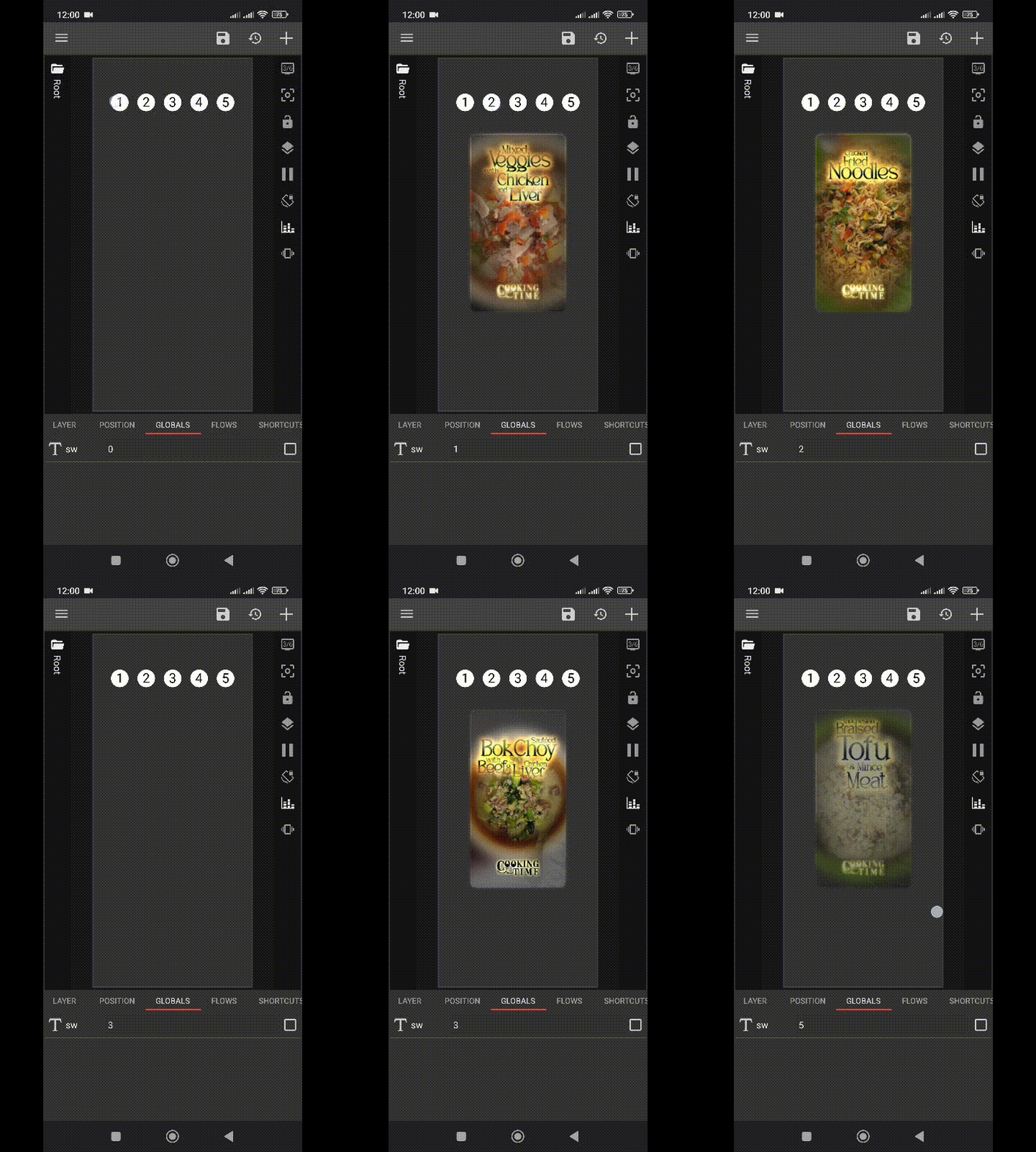
In the video, you can see me pressing the individual buttons; the elements open and close each other. After 5 seconds, the elements close on their own. Since my theme allows for a color change, I tapped that button a few times just for fun.

The solution:

1. Create a global text variable.

This contains the element number plus a timestamp (to close automaticaly after 5 seconds). For example, element1 has the entry “1, 171982345.” Button2 overwrites the entry with “2, 171982350.”

2. Button1, for example, gets this touch variable:

1,$df(S) + 5$

(current second + 5 seconds)

3. Animation using the following formula:

$if(tc(split, gv(gvName), “,”, 0) = 1 & df(S) < tc(split, gv(gvName), “,”, 1), 1, 0)$

This checks the following:

1. Is my own number at the beginning of the variable?

2. Is the current system time still less than the timestamp after the decimal point?

[Side Note:]
I stole the colored circle from another theme (but I only use my theme for myself, after all)

Hey! Just wanted to say thanks for sharing this solution. It’s a really clever workaround, especially for setups where people want to avoid native Kustom timers.

I actually gave it a test run out of curiosity. Quick heads-up: I had to tweak your animation formula slightly because it was throwing an ‘invalid argument count’ error. Here is the corrected version that worked for me:

$if(tc(split, gv(sw), “,”, 0) = 1 & df(S) < tc(split, gv(sw), “,”, 1), 1, 0)$

Must have been a small typo with the parentheses or arguments, but with this fix, it runs perfectly.

Honestly, using Unix timestamps (df(S)) opens up so many possibilities for complex, dynamic setups in Kustom—I use it quite a bit myself for advanced logic. That said, with the sheer volume of different requests and complex questions that pop up daily, it’s just impossible to find the time to thoroughly test and build out every single edge-case solution for everyone.

So, massive props to you for taking the time to map this out and share it with the community! :handshake: