Hey, using a flow more or less gets my kgwt profile working almost like the $tu… Setup.
My issue now is just how long it takes the flow to pick an image. When I run it it does eventually find an image (my background changes sometimes. I want it every 30m or so but the cron job isnt as simple as a timer…).
When I test the flow on my main wallpaper folder (2597 images) it takes a very long time, I usually cancel it because I know at some point it does work. If I point it to a subfolder with 5 images, it finds a new one instantly. What is the sweet spot for the flow function? How many images in a folder before it bogs down like I have? I have a button i use to manually shuffle the image but idk if it works because, well the flow takes ages to find an image. Old function found one in a second or two. Any way to speed this up?
I would suggest you to lower the number of image files on the folder. Me, I create a special folder in phone’s internal memory, for the wallpaper images, and I periodically review and renew its files (I periodically copy selected images from my memory card to this folder). The folder contains just about 20 image files, because I do not want the memory full issue with my phone.
In regards to the cron set-up in a Flow, here’s the front for task fine every 30 minutes:
This is unfortunately an Android API issue, there is no way to get contents of a folder faster if there are 2K images, it really sucks that Android is so bad in this, i could cache contents but then i would have no way to understand if they are changed. So best thing is to have 2 folders, one for “production” and one to test the flow.
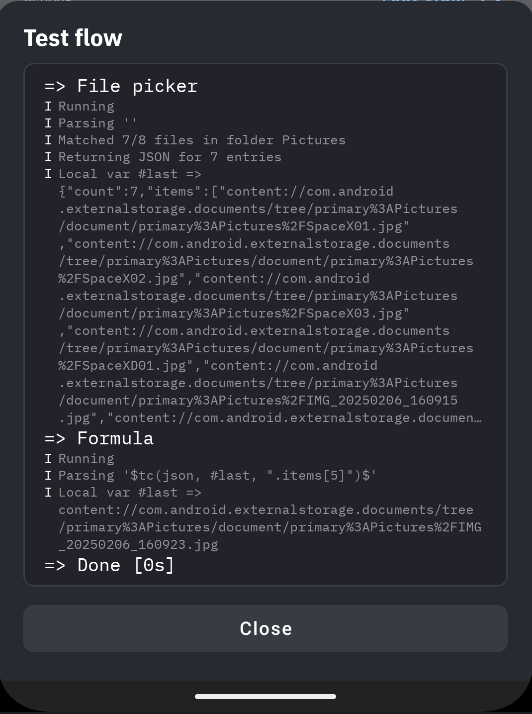
This is a very valid point, i will add an option to the document picker action to output a JSON in the next version. So you will be able to just do $tc(json, #last, “my json logic here”)$ so you could pick element “10” at “10 am”. Will deliver this in 3.78.
So in this case for example i am selecting image number 5 out of a list of 7 (this is NOT available yet):